










 ChatGPT
  Gemini
  Mistral



Pay Once, Use Forever
 One-Time Payment Lifetime Updates
Works with any  WordPress theme
AI Chatbot Built for WordPress
 WordPress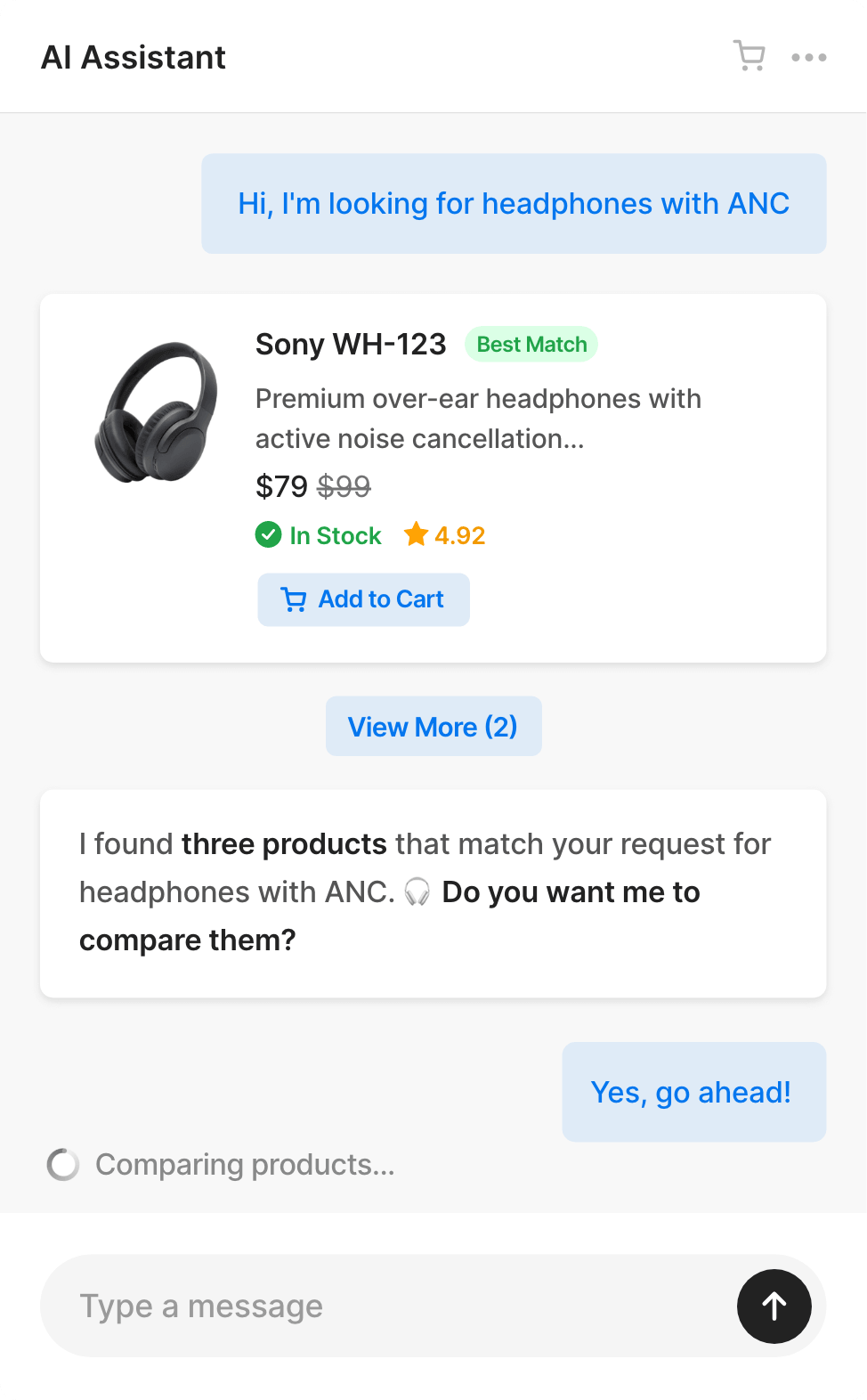

 n8n
n8n
 Zapier
 Make
Make
| AI Chat & Search | Chatbase.com | Chatbot.com | |
|---|---|---|---|
| Pricing Model | One-Time | Subscription | Subscription |
| First Year Cost | $49 | $384 | $624 |
| Second Year Cost | $0 | $384 | $624 |
| WordPress Native |  |
 |
|
| Monthly Messages | Unlimited | 2000 messages | 1000 chats |
| Database on Your Server | |
|
|
| Adjustable System Prompt | |
|
|
| WooCommerce Integration | |
|
|
| Image and Voice Messages | |
|
|
| Remove "Powered by" Label | |
$39 / month | |
| Send Email to Human |
|
|
|
| Integrations (n8n, Zapier, WhatsApp, Telegram) | |
|
|
| Live Chat Handoff to Human | |
|
|
| No API key required | |
|
|
Available AI Providers (Gemini and Mistral offer free tiers)
Gemini Open AI Mistral
First, make sure you have free version installed.
After your order is completed, you'll receive an email with:
- License key
- Use it at https://purethemes.net/license/ to download Pro version and manage active domains
Install and activate Pro add-on then go to AI & Chat Search → License and paste there your purchase key.
If you need our assistance simply send us message using plugins@purethemes.net
Need help with setting up plugin? Check How to Add ChatGPT or Gemini to WordPress Website: Step by Step Guide → or this guide for eCommerce owners WooCommerce AI Chatbot Guide →
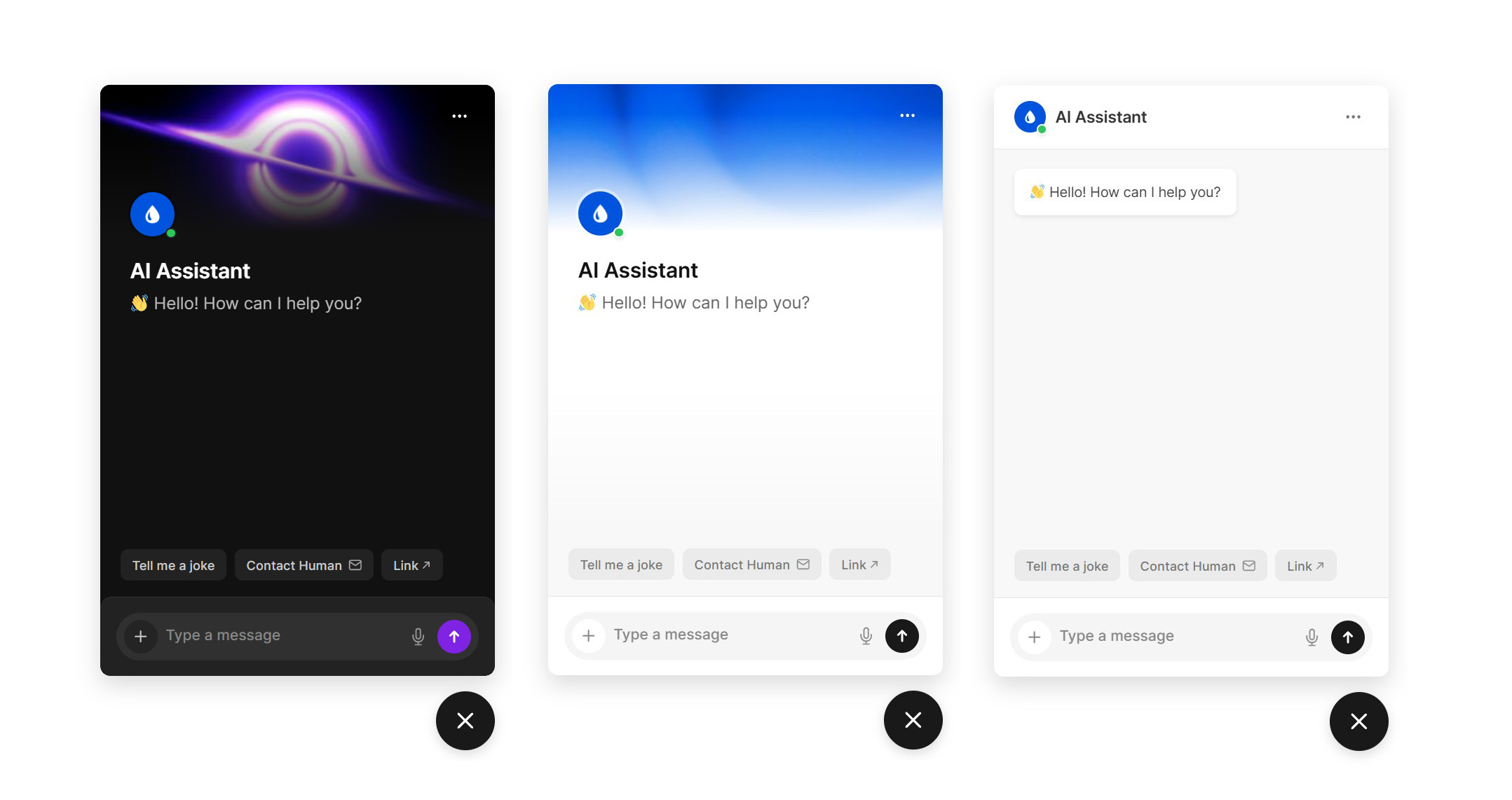
Yes! Our plugin has full dark mode with system-preference detection, per-button color controls, and a floating widget that resizes to fit any layout.
Three header modes:
- a clean minimal bar with welcome message
- a custom background image with gradient overlay
- or a procedurally animated silk wave effect
Not sure which AI Provider choose?
Check comparison article between ChatGPT, Gemini and Mistral →
 ChatGPT
Check our video guide. It's literally 2 minutes process.
How to Get an OpenAI/ChatGPT API Key→
With OpenAI's $5 credit balance (that's minimal amount), you can expect approximately following amount of messages before needing to add more credits.
~Up to 2,000-5,000 with GPT-4.1 Mini
~Up to 1,000 with GPT-5.2
These numbers are rather conservative, approximate and vary based on your custom instructions length, retrieved content for each message (products, pages), and response length.
In OpenAI you prepay credits. Gemini bills you after the cycle.
Available models: GPT 4.1-mini, 4.1, 5 Mini, 5, 5.1 and 5.2
 Gemini
Total estimated cost for ~1,000 - 3,000 messages using Gemini 3 Flash: $5 on paid tier.
Please keep mind that free tier allows only up to 10 requests to AI per minute + training only 100 items per minute.
Available models: Gemini 3 Flash, 3 Pro, 2.5 Flash and 2.5 Pro
 Mistral
How to Get an Mistral API Key→
Mistral has similar pricing to Gemini and ChatGPT.
Available models: Mistral 3 Small, Medium and Large
You can add there info about your shop, specific instructions about your website’s focus, target audience, or special features to help the AI provide more relevant and personalized answers to your visitors.
Example:
IMPORTANT:
 – This is an online store focused on home and lifestyle products. We sell furniture, decor, and kitchen accessories with worldwide shipping.
 – If users ask about orders, explain that they can track their order in the “My Account” section or contact support for help.
 – If users ask about returns, tell them we accept returns within 30 days for unused items in original packaging.
CONTACT INFO:
- If someone asks you about how to contact us provide him support@sample.com and phone +1 123 345 789
- Our customer service hours are 9am–15pm Monday to Friday
To improve the AI chatbot’s replies to generic questions like "recommend something for my living room" you need to give him an idea what your website is about
IMPORTANT:
- This is an eCommerce store for home and lifestyle products. We help users find the best items for their home and daily life.
- When asked generic questions like "what should I buy" or "what do you recommend", search for matching products from our WooCommerce catalog.
In general, prompting is an art – the quality of an AI’s answer depends on the prompt or instructions. Sometimes too many examples can confuse the model, but too few can also lead to poor results.
If a user asks for “good headphones” or “good chair,” the AI may auto-apply a rating filter (e.g. 4.5+). If items have no ratings, it may return no results. That’s why you need to tweak prompt on your own and e.g. add: “Don’t apply a rating filter unless the user asks for it.”
Add decision logic to clarify your content types. Universal decision logic is already inside built-in system prompt but you might want to extend it with samples from your website content.
DECISION LOGIC:
- Question about listings such as [examples] → use search_listings()
- Generic products such as [examples] → use search_products()
- Generic questions about website content such → use search_universal_content()
Use GPT-5.1 or GPT-4.1 instead of GPT-4.1-mini for better quality if you have long custom instructions. Small prompt changes can significantly impact behavior.
✅ Runs directly on your WordPress website
✅ You control your OpenAI/Gemini API costs
✅ Your database stays on your server
Note: MySQL database which WordPress uses, lacks native vector search - all similarity calculations run in PHP so search speed depends on your server CPU and number of indexed items.
✅ Optimized for up to a few thousand items/pages/products
✅ No external database indexing. Fast setup. Predictable performance.
If you’re tech-savvy, check our article on how RAG-powered chatbots work.
Yes! It also has full integration with WooCommerce and the Listeo directory WordPress theme. This integration allows displaying product or listing cards directly inside the chat.
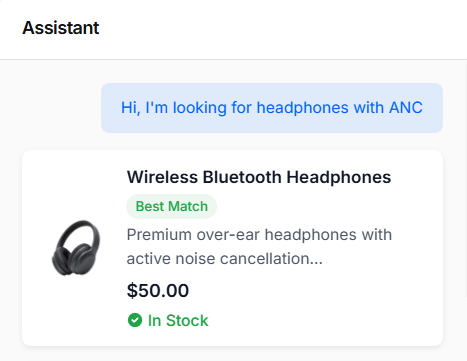
💡Note: Cards in chat are displayed only for WooCommerce products (any theme) or listings (Listeo theme)
In other themes, the Pro version can learn from pages/custom post types, but custom post types use a keyword-based search without filters. Full filtering works only with WooCommerce products.
The plugin offers extensive customization through several settings tabs.
You can download free version to see it yourself 🙂
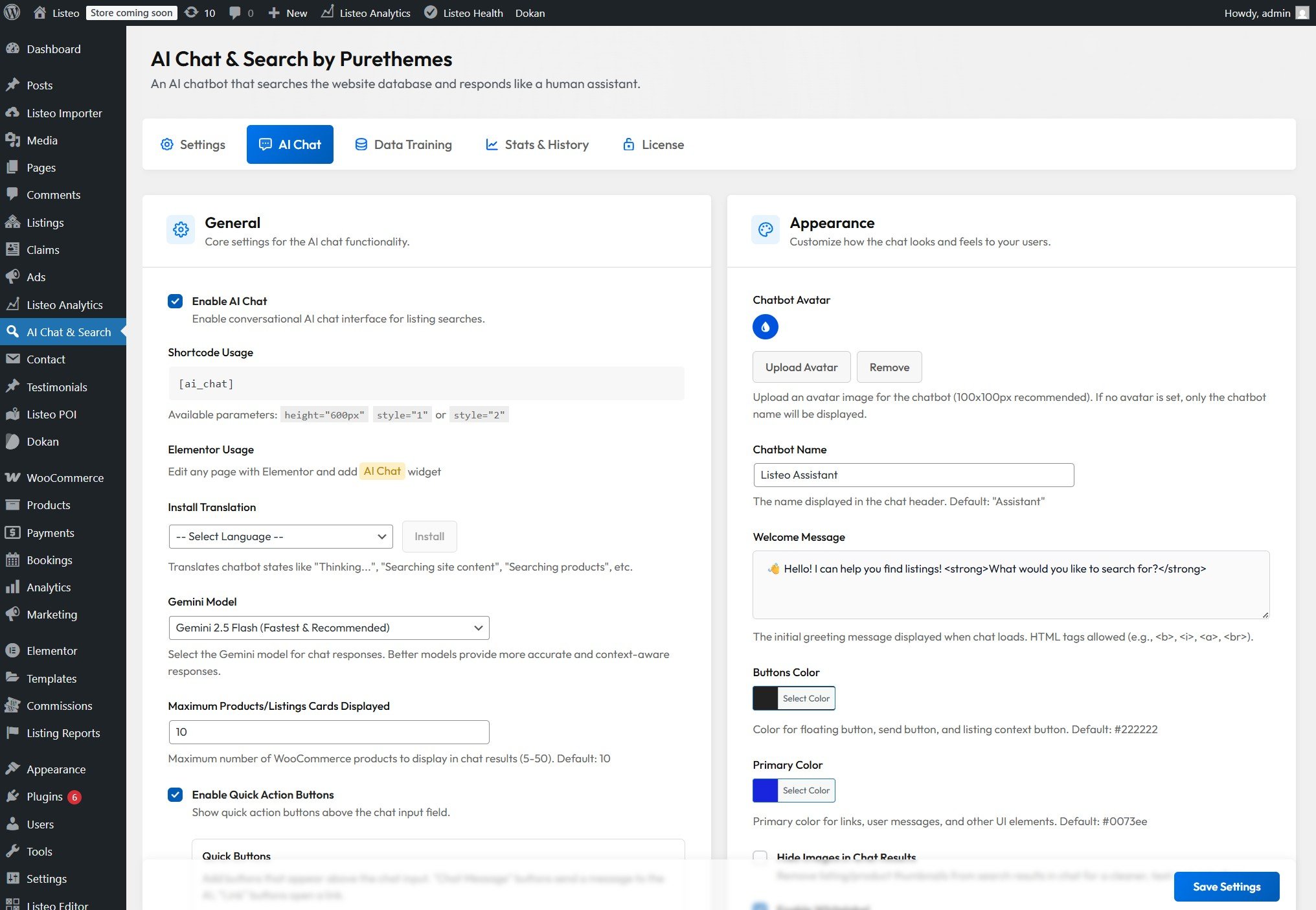
Here's brief summary:
- General
Enable/disable chat, choose AI model (GPT-5.1, GPT-4.1, GPT-4.1-mini and Gemini 3 Pro, 2.5 Pro, 2.5 Flash), set maximum products displayed in results, add quick action buttons above chat input : predefined question to AI, link button (e.g. to a page or whatsapp) and contact form popup) - Appearance
Custom chatbot name and avatar, welcome message (supports HTML), brand colors for buttons and UI, option to hide product images in results, whitelabel mode (Pro) - Floating Widget
Enable/disable floating chat bubble, custom SVG icon, welcome bubble text, popup dimensions (width/height), hide on specific pages - AI Tools
Custom system prompt (up to 6,000 characters) for business-specific instructions, enable AI-powered email sending on behalf of visitors - Access & Privacy
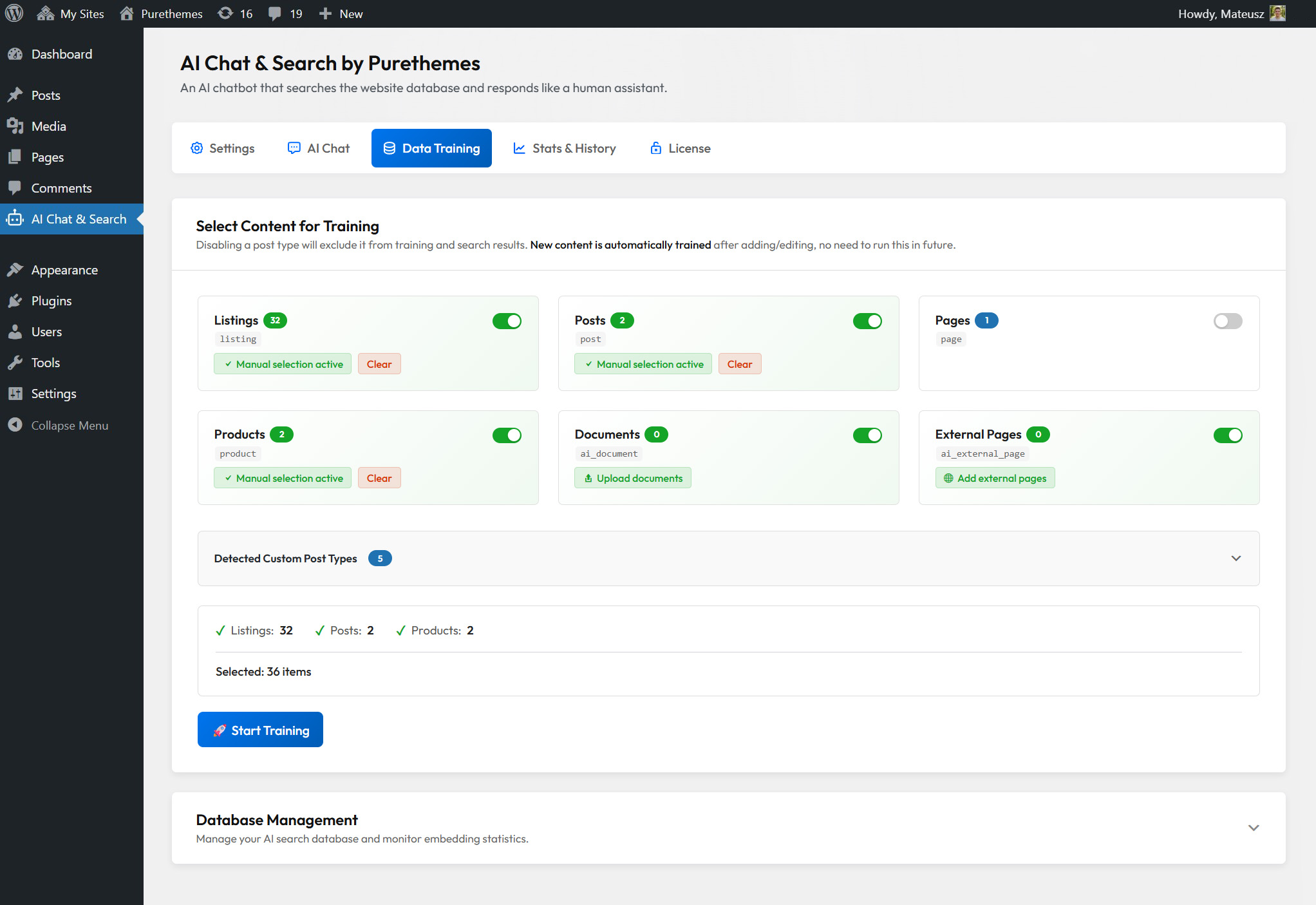
Restrict chat to logged-in users only, show terms of use notice, enable conversation tracking (auto-deleted after 30 days) - Data Training
Select content types to train (posts, pages, PDFs, WooCommerce products, custom post types), manual selection mode, database management tools (check/regenerate/delete embeddings) - Analytics
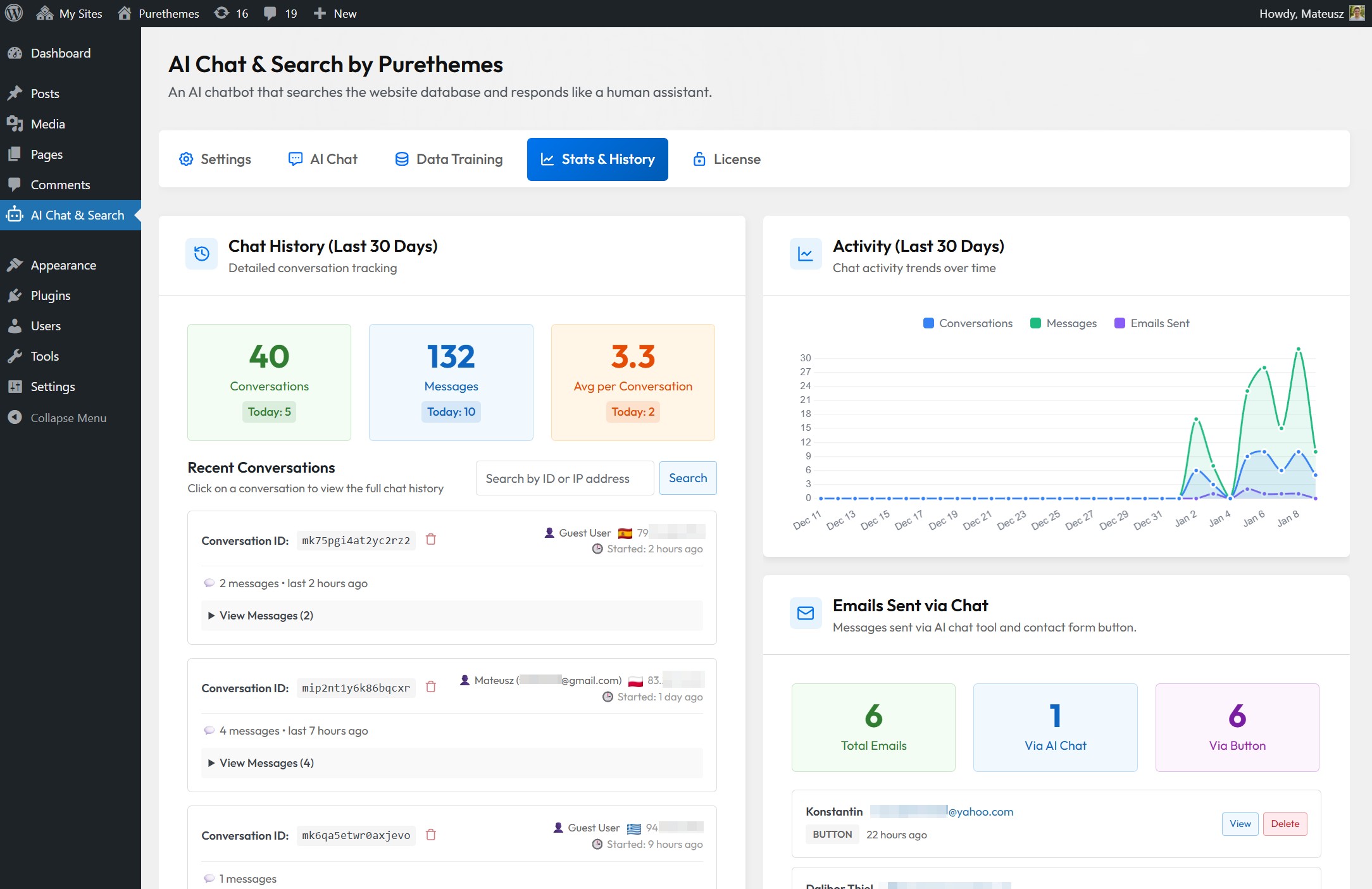
Conversation statistics, popular search queries (7/30 days), email tracking
It allows users to send voice messages (converted to text via AI) and upload images for AI analysis. Audio and images are never stored on your website or database and are sent directly to the AI service. Images are transmitted as base64-encoded data, a standard text-based format for safely sending files.
Visitors can attach pictures that help them explain what they’re looking for and help the AI understand it.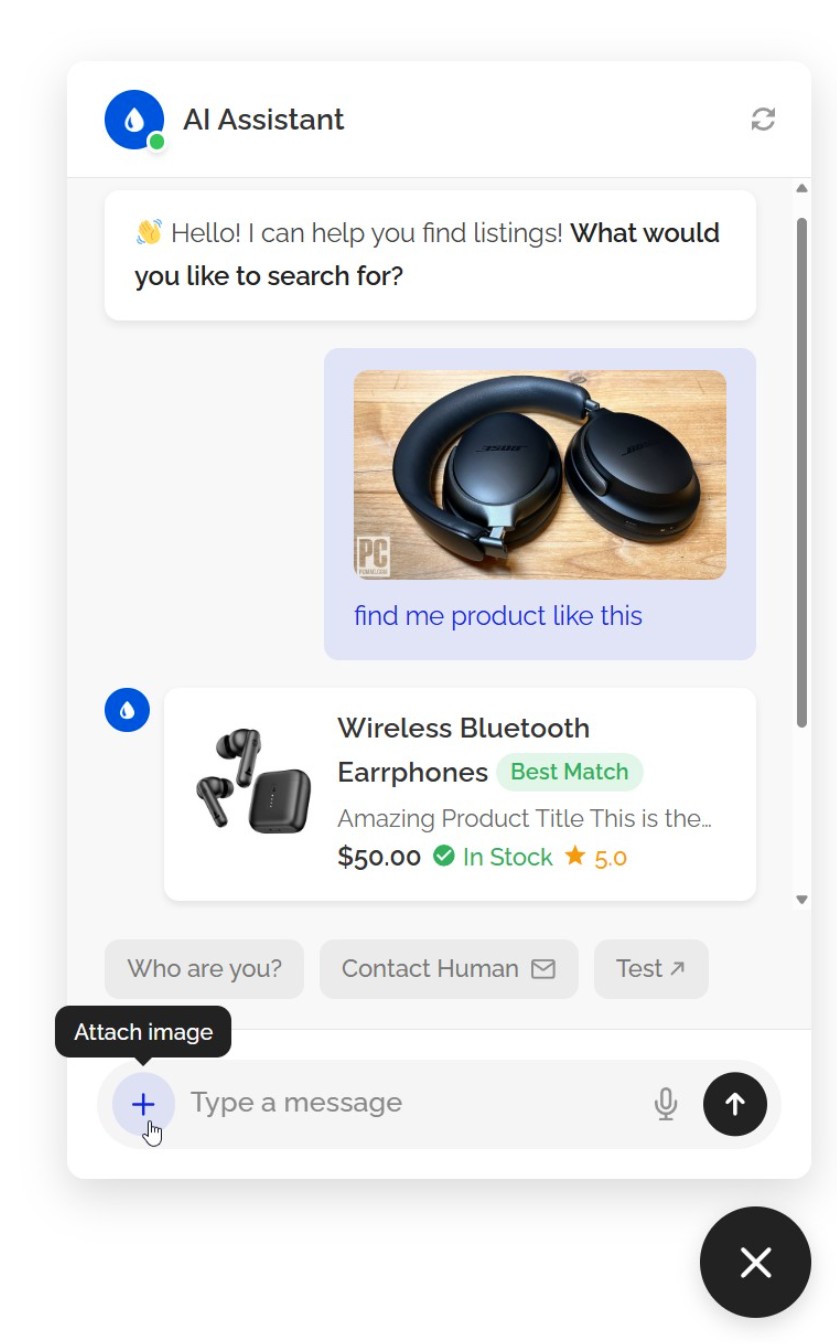
This feature is making it faster and easier for users to share information without typing.
The plugin includes several privacy-by-design features:
- Terms of Use Notice - Customizable notice users must acknowledge
- 30-day auto-deletion - Chat history automatically purged
- Data stays on your server - All conversations stored in your WordPress database unlike competitors who keep your visitors conversations on their servers
- Minimal data to AI providers - Only the search query/message is sent to OpenAI/Google - they don't store your data per their API terms
- PII-stripped order lookups - When users check order status, personal information (names, addresses, emails, phone
numbers) is never sent to AI providers - only order status, items, and tracking info
What data is sent to OpenAI/Google/Mistral?
Only the user's message/query and your pages content (for context). No personal data, IPs, or user identifiers are transmitted. Both providers have data processing agreements and don't use API data for training.
Which AI provider is best for GDPR compliance?
Mistral AI is the most GDPR-friendly option. Unlike OpenAI and Google, Mistral is headquartered in Paris and not subject to the US CLOUD Act, which allows American authorities to access data even when stored on EU servers.
Can users request data deletion?
For logged-in users, their chat history can be identified by user ID. For guests, data is only linked to a browser session ID and auto-deletes after 30 days.
As you can see in the changelog below, we constantly update and improve our chatbot.
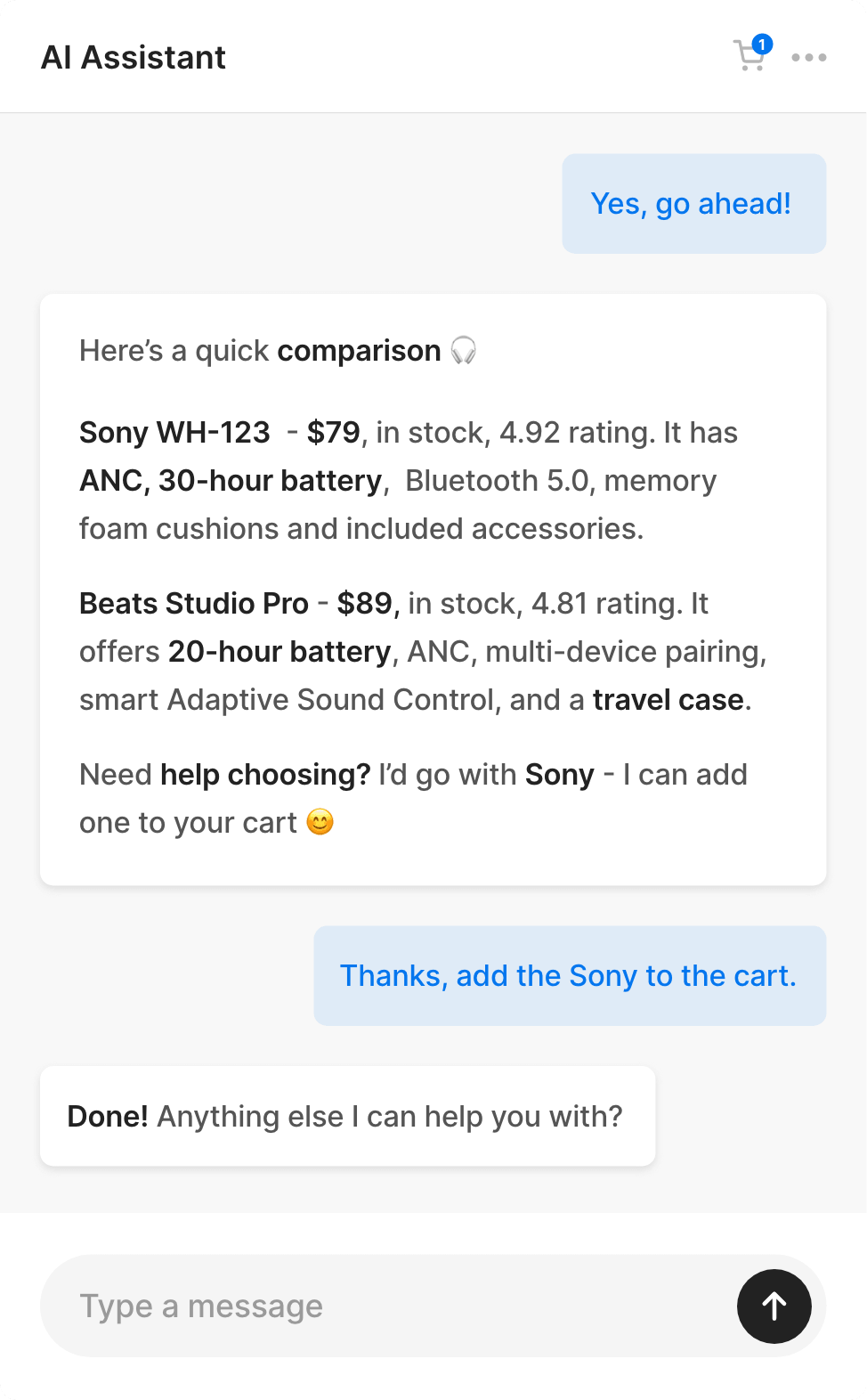
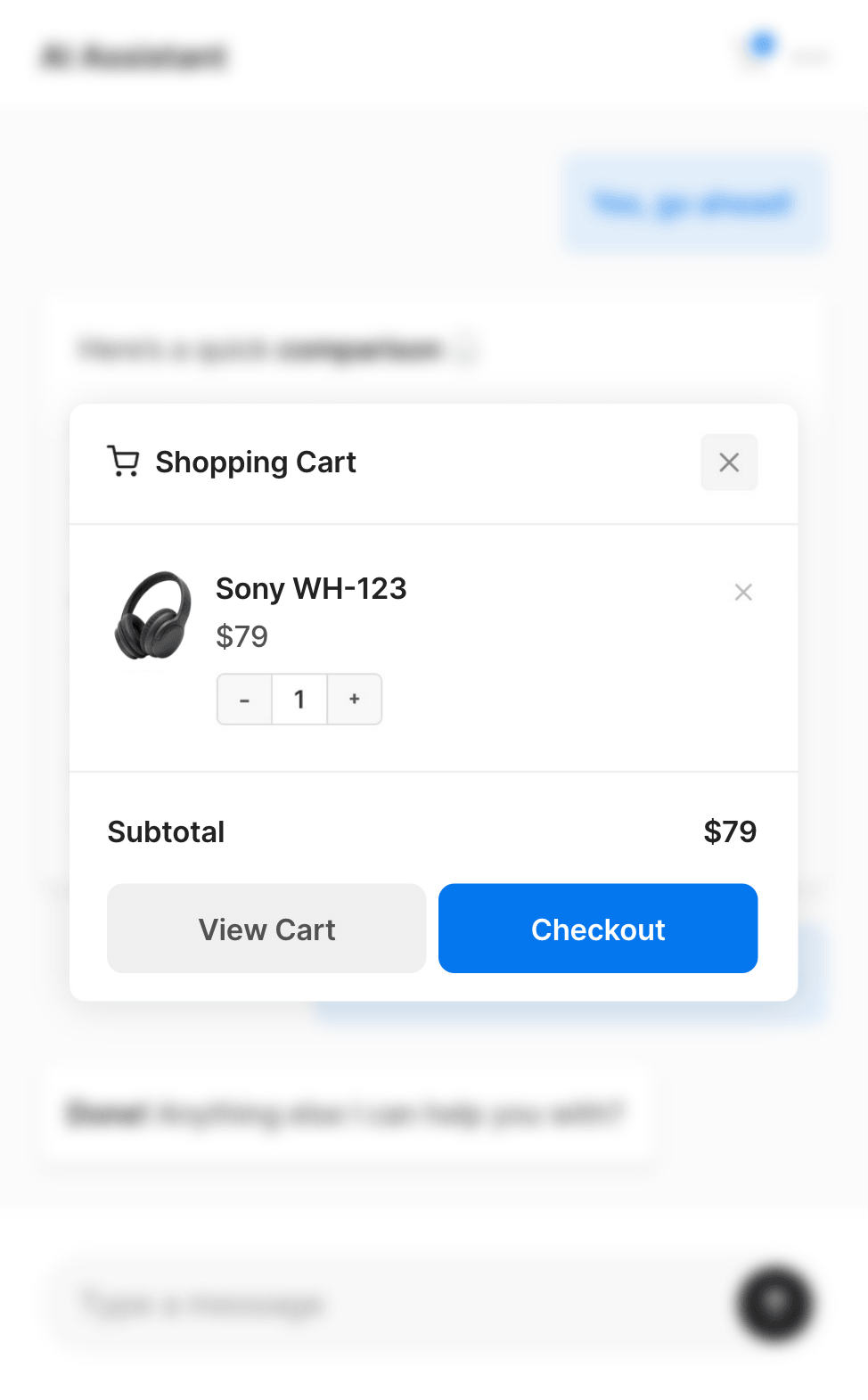
1.9.6 - New feature: WooCommerce Cart in Chatbot - Shows "Add to Cart" buttons on product cards and a cart icon in the chat header.
cards and a cart icon in the chat header.
- Option to adjust AI's user messages memory (how many previous user messages AI sees during conversation), the setting is in Search Quality & Thresholds > Additional Threshold Settings > Conversation Context Length
1.9.5 - New feature: Hints for AI - you can direct the AI to use a specific page or document when answering certain questions (option is in AI Chat tab - AI Tools section)
- Option to modify floating widget horizontal/vertical position in AI Chat / Floating Widget settings
1.9.4 - Performance fix: optimized data training page loading speed for large databases
1.9.3 - Added support for GPT 5.4 Mini and 5.4 Nano
- New feature: Pre-chat form - collect visitor info before chat; you can add custom fields; data appears in chat history. Enable in AI Chat → Access & Privacy → Pre-chat form (clear cache if using a caching plugin)
1.9.2 - Security fixes
- WooCommerce products that are not in stock won't be displayed in search results
- [time] shortcode that can be added in custom instructions (prompt) so AI knows exact time of your site timezone
1.9.1 - WooCommerce variable pricing compatibility
- Support for WPC Price by Quantity plugin
- GPT 5.4 reasoning effort parameter fix
1.9.0 - Added GPT 5.4 and 5.3
- Added Gemini 3.1 Flash Lite
- Compatibility improvements with page builders (Breakdance, Bricks, Oxygen etc.)
1.8.9 - Option to align floating widget to the left or right side
- Added Gemini 3.1 Pro (replaces 3.0 Pro which will be disabled by Google on 9th March)
1.8.8 - Minor Fixes
1.8.7 - WooCommerce fixes (AI uses price with tax + can fetch shipping number)
- Documents embedding optimisations
- Option to disable custom fields in embeddings
1.8.6 - Webhook Automation (e.g. N8N, Zapier, Make)
- WhatsApp Integration (via Twilio)
- Telegram Integration
1.8.5- Option to add background image in chat header (Floating Widget → Initial Header Style)
- Option to modify each Quick Button color
1.8.4 - Security improvements: centralized IP detection preventing IP spoofing via header injection and XSS prevention improvements
- More details about user when hovering over IP address in chat history
1.8.3 - Translations for all plugin settings in WordPress admin
- In the chat history, each user message shows the page it was sent from
1.8.2 - Added dark mode (color scheme setting)
1.8.1- Improved compatibility with Divi page builder
1.8.0 - Added product/listing comparison tool — after searching, you can ask the AI to compare X and Y.
1.7.9 - AI responses with a smooth word-by-word typing effect
- Menu in chat window with start new chat and expand window options
1.7.8 - External page sources – chatbot can be trained with content from external web pages
1.7.7 - Added SKU and EAN/GTIN codes to WooCommerce product embeddings
1.7.6 - Admin user interface improvements
1.7.5 - Additional training document formats (txt, md, csv, xml)
- Chat conversations activity visual graph
1.7.4 - Added Mistral AI Provider
1.7.2 - Embedding generation optimization for non-lating languages (Cyryllic, Greek)
1.7.1 - Image Uploads & Voice Messages
1.7.0 - Vector search speed optimization
1.6.9 - Enhanced user IP-based rate limiting (max messages per 1 minute / 15 minutes / day)
1.6.8 - Couple of minor improvements
1.6.7 - Option to block specific user IP from accessing chatbot
- Option to change AI loading icon animation style
1.6.6 - Improved compatibility with popular WooCommerce themes
- Improved auto-detecting language from user messages
1.6.5 - Security fix
- User IP and country display in chat conversation history