









WooCommerce AI Chatbot Guide 2026: Automate Sales & Support
Running a WooCommerce store means answering the same questions daily. “Do you have this in red?” “When does my order arrive?” “What’s your return policy?” Meanwhile, customers leave when they can’t find products fast enough.
A WooCommerce AI shopping assistant changes that. It handles customer questions 24/7, helps visitors find products using natural language, and actually understands what shoppers want. Not keyword matching. Real understanding.
What Is a WooCommerce AI Shopping Assistant?
The assistant connects directly to your WooCommerce database. It knows your products, prices, stock levels, and can even check order status for customers. Think of it as a smart sales assistant that never sleeps, never gets tired, and can handle hundreds of conversations simultaneously
This guide walks you through everything you need to know about adding an AI shopping assistant to your WooCommerce store.
Why Your WooCommerce Store Needs One
Here’s what a solid AI shopping assistant actually does for your store:
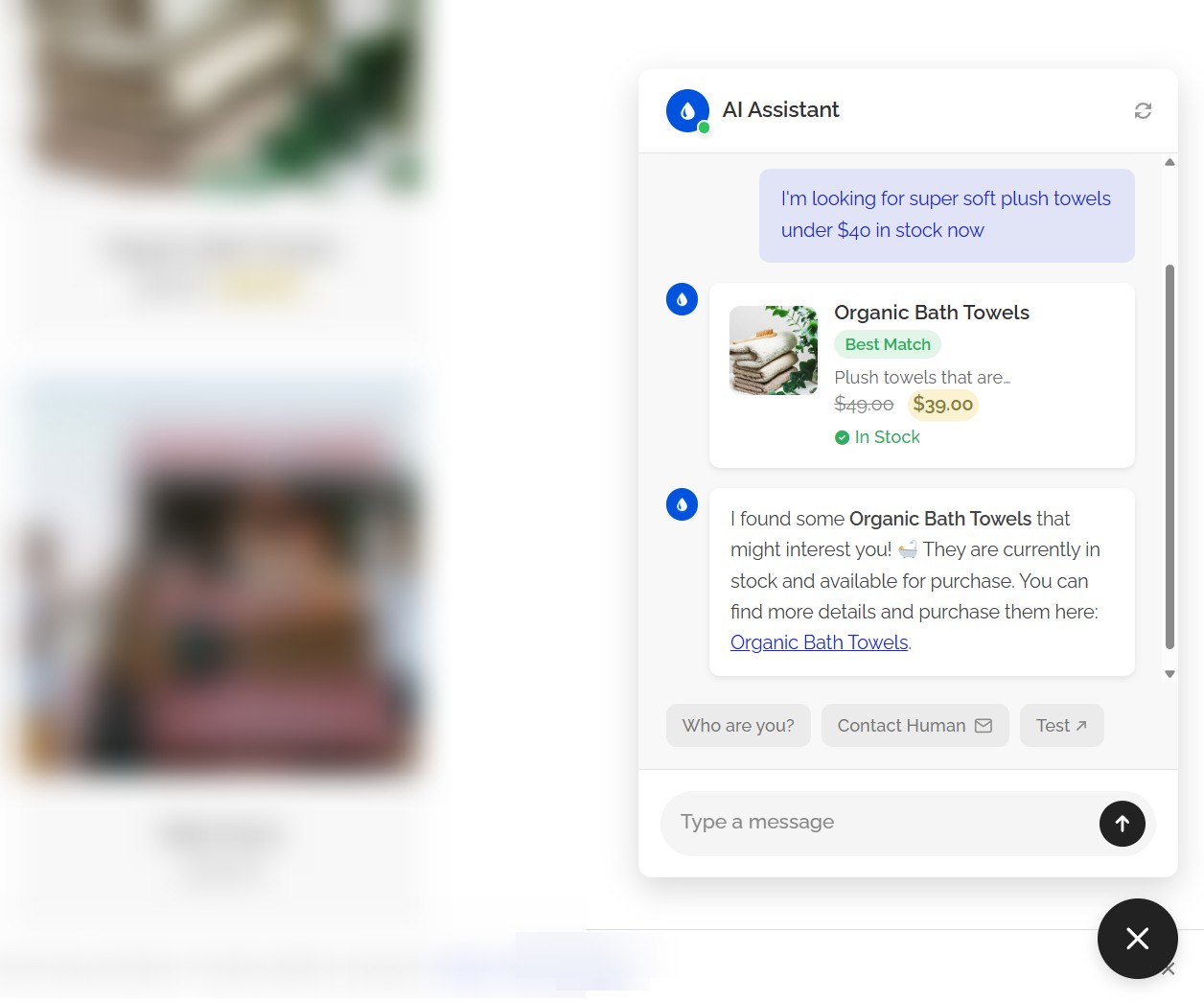
- Semantic product search. Customers describe what they want in their own words. “Waterproof hiking boots under $100” or “something blue for a summer wedding.” The AI understands intent, not just keywords, and shows matching products.
- Product cards in chat. Results appear as visual cards with images, prices, stock status, and ratings. Shoppers can browse right inside the conversation without jumping between pages.
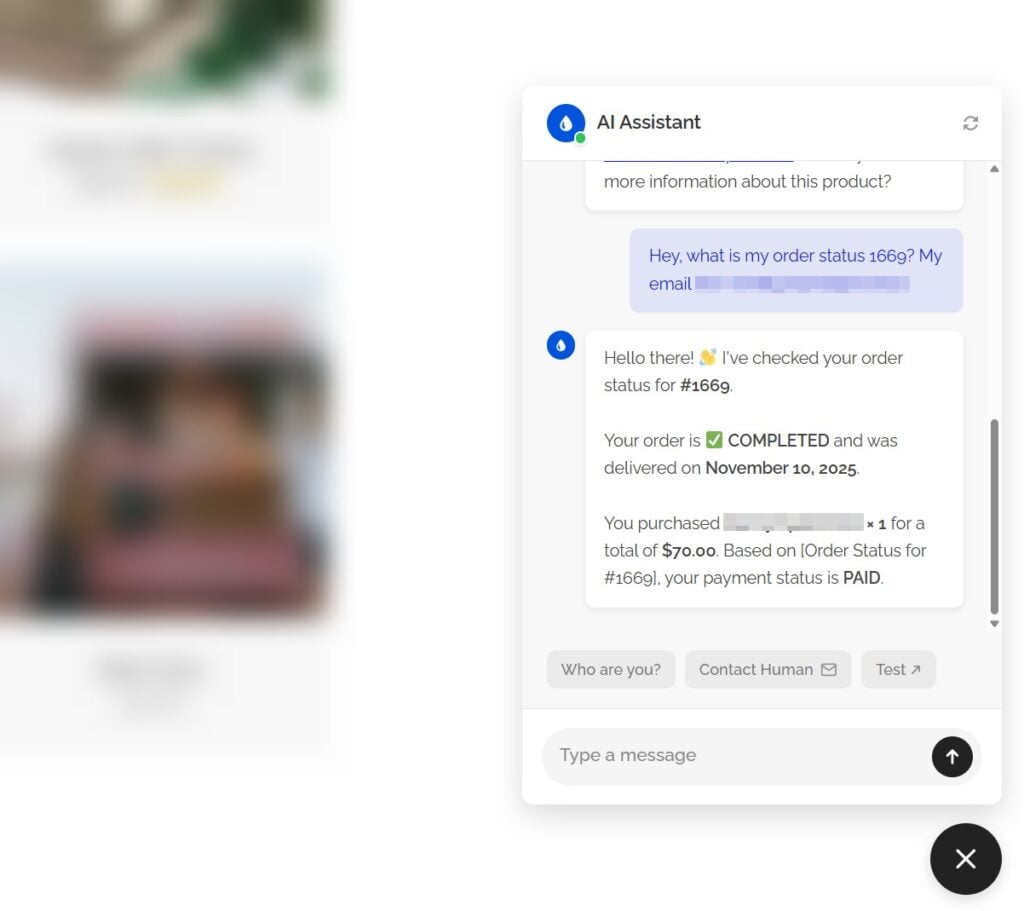
- Order tracking. “Where’s my order?” pulls real status from WooCommerce. No generic responses. Actual tracking info.
- Stock availability. The AI only recommends products that are actually in stock. No frustrated customers clicking through to find “out of stock” messages.
- Price filtering. Customers can ask for products within a budget, and the AI applies filters automatically.
Setting Up an AI Shopping Assistant
Getting started takes about 15 minutes. Here’s the quick version.
Step 1: Install a plugin. You need a WordPress plugin that connects your WooCommerce store to AI models. AI Chat & Search is one option that works natively with WordPress and WooCommerce.
Step-by-step guide of setting up chatbot is here →
Step 2: Get an API key. Head to OpenAI (platform.openai.com/api-keys) or Google AI Studio (aistudio.google.com/api-keys) and create an API key. Takes 30 seconds.
Step 3: Connect and train. Paste your API key in the plugin settings, hit “Start Training,” and the plugin scans your WooCommerce products to create a searchable index.
That’s the basic setup. The chatbot starts working immediately.

Customizing for Your Store
Here’s where it gets interesting. You can tell the AI exactly how to behave using natural language. No flowcharts. No decision trees. Just instructions.
Example for a furniture store:
This is an online furniture store. We sell home decor, furniture, and kitchen accessories with worldwide shipping.

If users ask about orders offer them that you can check their order directly in chat or explain they can track in "My Account" or contact support.

If users ask about returns first read our privacy policy and say we accept returns within 30 days for unused items.
Keep a friendly, helpful tone. Avoid technical jargon.

Contact: support@mystore.com, Mon-Fri 9am-5pm
The AI follows these instructions in every conversation. Someone asks about shipping? It knows your policy. Questions about contacting support? It has the answer ready.
Pro tip: Create most common FAQs page – your chatbot will be able to read and learn it. You can also write them in custom instructions – the AI can answer instantly without even searching your database.
WooCommerce-Specific Features
| Feature | What It Does |
|---|---|
| Semantic product search | Understands natural language like “blue dress under $50” |
| Product cards in chat | Shows images, prices, ratings, and add-to-cart buttons |
| Order status lookup | Pulls real tracking info from WooCommerce |
| Stock awareness | Only recommends in-stock products |
| Price and rating filters | Applies filters automatically based on customer requests |
A proper WooCommerce integration includes features that generic chatbots don’t offer:
Product filtering. Filter by price range, star ratings, sale items, and stock availability. When a customer asks for “highly rated earphones under $70,” the AI applies those filters automatically.
When asked by user, the AI can fetch all products details and answer specific questions about them

Order status lookup. Customers enter their order number and get real tracking info pulled directly from WooCommerce.
Product cards can include direct links to add items to cart, shortening the path to purchase. Variable product handling. The AI understands product variations like sizes and colors, helping customers find exactly what they need.
What About Costs?
Most AI chatbot platforms charge monthly subscriptions. $59/month minimum for basic features, $95-360/month for proper WooCommerce integration. That adds up to $588-4,320 per year.
There’s another approach: one-time payment plugins where you bring your own API key. The plugin costs $59 once, and API fees run about $5 for every 5,000 customer conversations.
For most WooCommerce stores, the one-time payment model makes more sense financially. You get the same AI models (GPT or Gemini) without recurring fees eating into margins.
Check this AI Chatbot for WooCommerce →
Common Questions
Does AI chabtot slow down my site?
No. The chat widget loads asynchronously, and AI processing happens on OpenAI or Google servers. Your site stays fast.
Can it handle multiple languages?
Yes. Modern AI models respond in whatever language the customer uses. French customer, French response. No configuration needed.
What if someone tries to spam the chatbot?
Rate limiting prevents abuse. Both client-side and server-side limits are in place, so spammers hit walls before causing problems.
Does it work with my theme?
Most AI chatbot plugins work with any WordPress theme. The chat widget floats on top of your existing design.
How accurate are the answers?
Accuracy depends on your training data and custom instructions. The AI only knows what you teach it. Good product descriptions and clear instructions mean better answers.
Bottom Line
A WooCommerce AI shopping assistant handles repetitive support questions, helps customers find products faster, and works around the clock. The technology has matured enough that setup is genuinely simple now.
Whether you choose a subscription service or a one-time payment plugin, the key is picking something built specifically for WooCommerce. Generic chatbots miss features like product filtering, order tracking, and stock awareness that make the real difference for e-commerce.