









How to Add Semantic Search to WordPress and WooCommerce

Ever searched for something on a website and got zero results, even though you know the content exists? That’s standard WordPress search – only finds exact keyword matches. Type “affordable running shoes” and it won’t find your “budget-friendly jogging sneakers” because the words don’t match.
Semantic search fixes this. Instead of matching exact words, it understands meaning. And you can add it to any WordPress site or WooCommerce store without coding.
What is Semantic Search?
Traditional search looks for exact keywords. No match, no results.
Semantic search uses AI to understand what users actually mean. The technology (called vector embeddings) converts your content and search queries into mathematical representations of meaning, then finds the closest matches. To learn more about this technology check our article about RAG (Retrieval Augmented Generation) →
Here’s what this looks like in practice. An example for a WooCommerce store:
| What Customers Search For | Standard WordPress Search | AI Semantic Search |
|---|---|---|
| wireless earbuds | ❌ No results if product titled “Bluetooth headphones” | ✅ Finds Bluetooth headphones, TWS earphones |
| something for tired skin | ❌ No results – “tired” not in product descriptions | ✅ Finds vitamin C serums, brightening creams, revitalizing masks |
| comfy shoes for standing all day | ❌ No results – conversational query fails | ✅ Finds ergonomic footwear, cushioned insoles, supportive sneakers |
| laptop carrying case | ⚠️ Only if exact phrase exists | ✅ Finds notebook bags, computer sleeves, MacBook cases |
The difference in conversion rates is significant. Visitors who use site search convert 2-3x higher, but only if they find what they’re looking for.
Real example to give you an idea how good is this, lets say you have towels in shop. Will your regular keyword search return towels if would search for “something to soak up water from my body“? I guess it won’t. 🙂
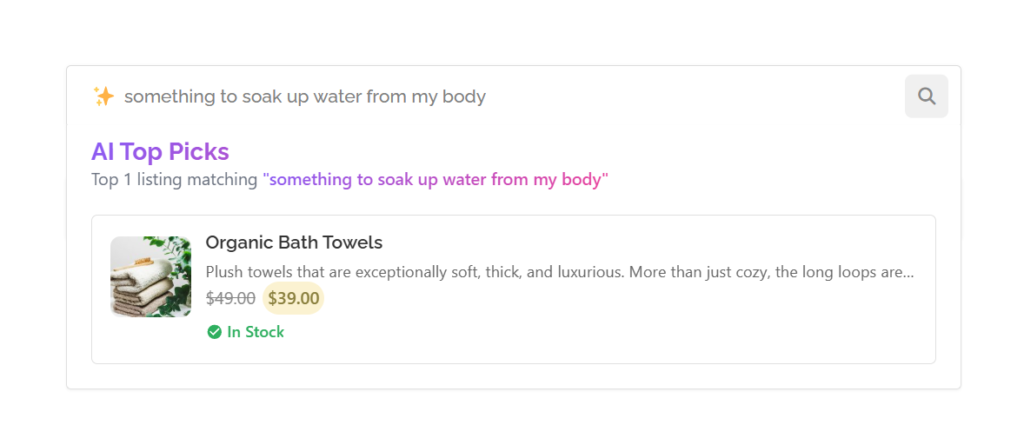
The difference in conversation rate is significant. Visitors who use site search and find relevant results convert 2-3x higher but only if they find what they are looking for.
The Problem with Default WooCommerce Search
WooCommerce inherits WordPress’s basic search. It does simple keyword matching against product titles and descriptions. That’s it.
For stores with hundreds of products, limitations become painful:
- Customers describe products differently than you do
- Synonyms don’t work (“sneakers” won’t find “trainers”)
- Natural language queries fail completely
- Misspellings return nothing
- Related products never surface
Think about how people actually shop. They don’t search “SKU-12847-BLK-XL.” They search “black hoodie for working out” or “something warm for camping.” Default search can’t handle this.
Your potential customers give up and leave. Or worse, they find competitors who have better search.
AI Chat & Search Pro: Semantic Search for Any Theme
AI Chat & Search Pro adds AI-powered semantic search to any WordPress theme. WooCommerce stores, blogs, membership sites, whatever you run. This plugin features albo chatbot functionality, if you’d like to learn more how to automate sales and support in your store check our article about WooCommerce AI Chatbot Guide: Automate Sales & Support
Key features:
- Works with OpenAI or Google Gemini (your choice)
- Creates vector database of your content
- Simple shortcode implementation
- No theme restrictions
- Searches products, posts, pages, or custom post types
The plugin provides a shortcode builder that lets you add semantic search anywhere on your site.
How It Works

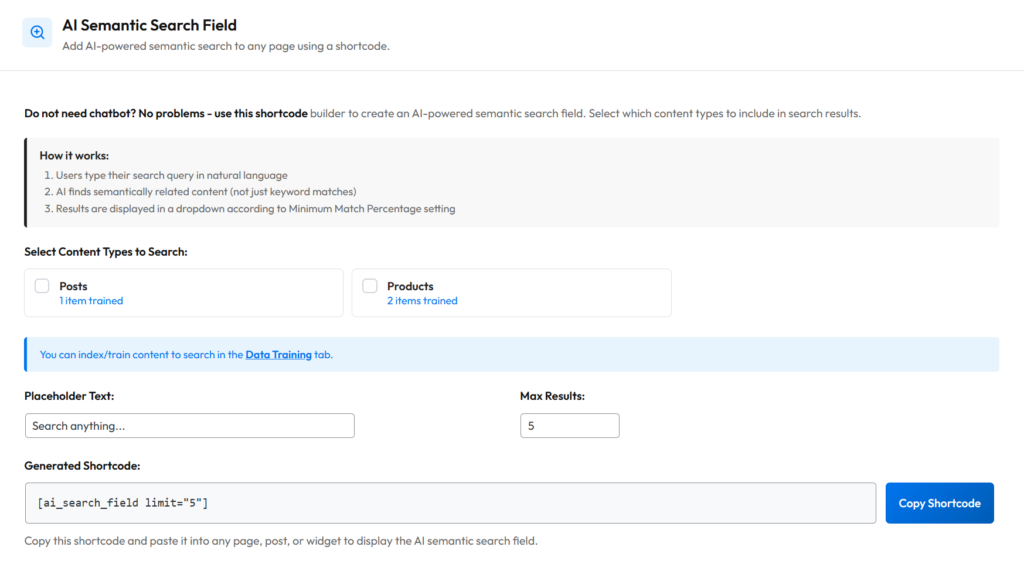
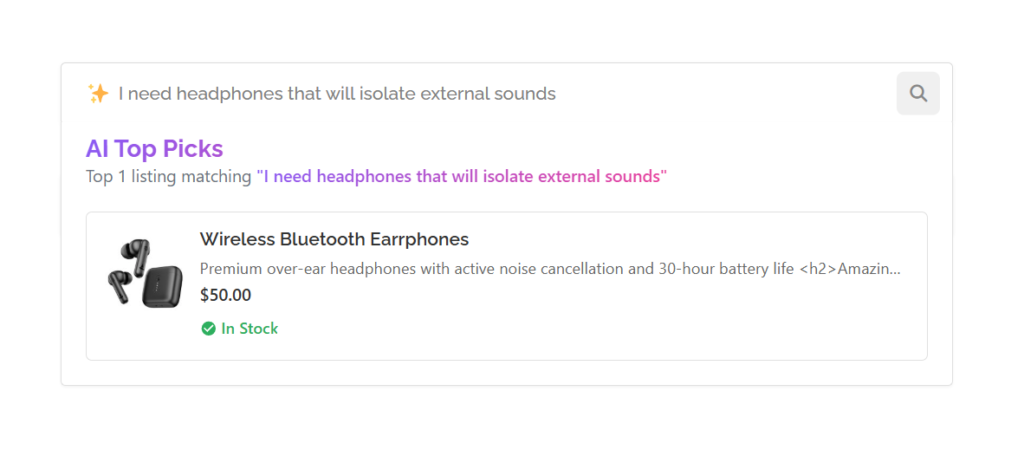
The plugin has a dedicated “AI Semantic Search Field” feature. Here’s the flow:
- Users type search query in natural language
- AI converts query into vector embedding
- Plugin compares against your pre-trained content
- Results display in dropdown, ranked by match percentage
Someone searching “waterproof jacket for hiking” finds your “outdoor rain shell” and “trail-ready weatherproof coat” even though those exact words don’t appear. The AI understands that waterproof, rain shell, and weatherproof are semantically related.
This works because vector embeddings capture meaning, not just words. “Laptop bag” and “notebook carrying case” end up close together in the vector space even though they share zero words.
Setting Up Semantic Search: Step by Step
Step 1: Install the Plugin
Download AI Chat & Search Pro from purethemes.net. Install via Plugins > Add New > Upload Plugin.
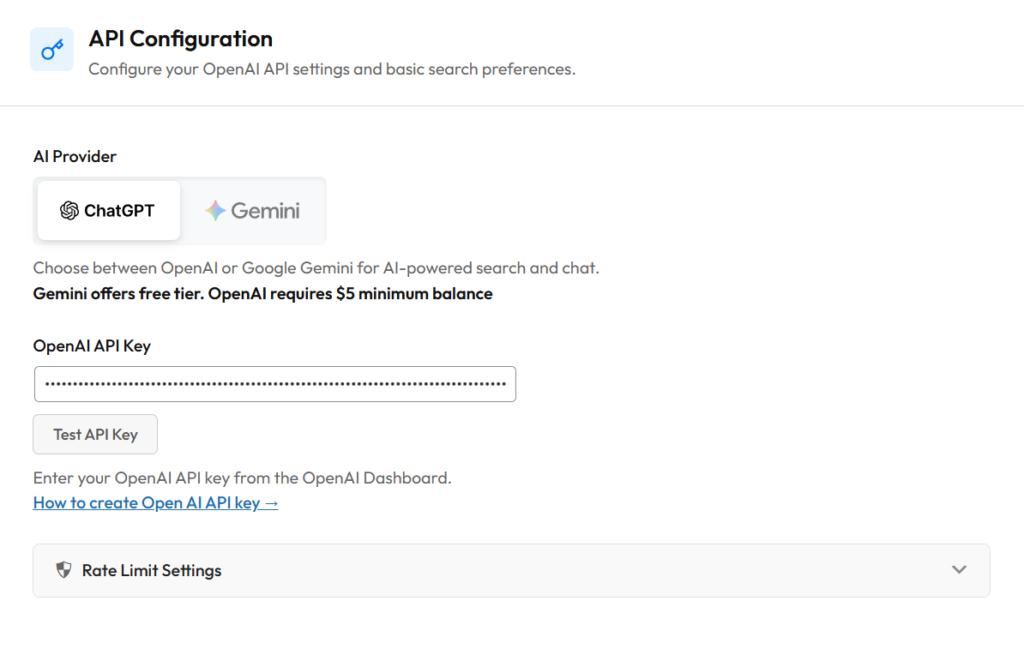
Step 2: Add Your API Key
Go to AI Chat & Search in your WordPress sidebar. Add your API key from either:
- OpenAI: platform.openai.com
- Google Gemini: Google AI Studio
Step 3: Train Your Content
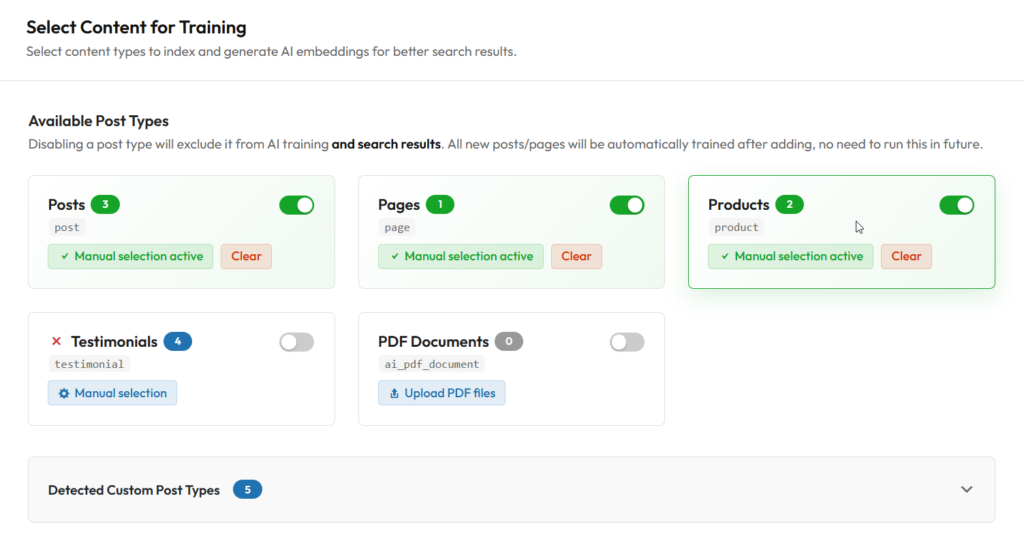
Navigate to Data Training tab. Select content types to index:
- WooCommerce Products
- Blog Posts
- Pages
- Custom Post Types
Click “Start Training.” The plugin processes your content and creates embeddings. Takes a few minutes depending on catalog size.
Step 4: Generate Your Shortcode
Go to AI Semantic Search Field settings. The visual builder lets you configure:
- Content types to search (Products, Posts, Pages)
- Maximum results (how many items in dropdown)
- Placeholder text (what users see before typing)
Plugin generates shortcode automatically:
[ai_search_field post_types="product" limit="5"]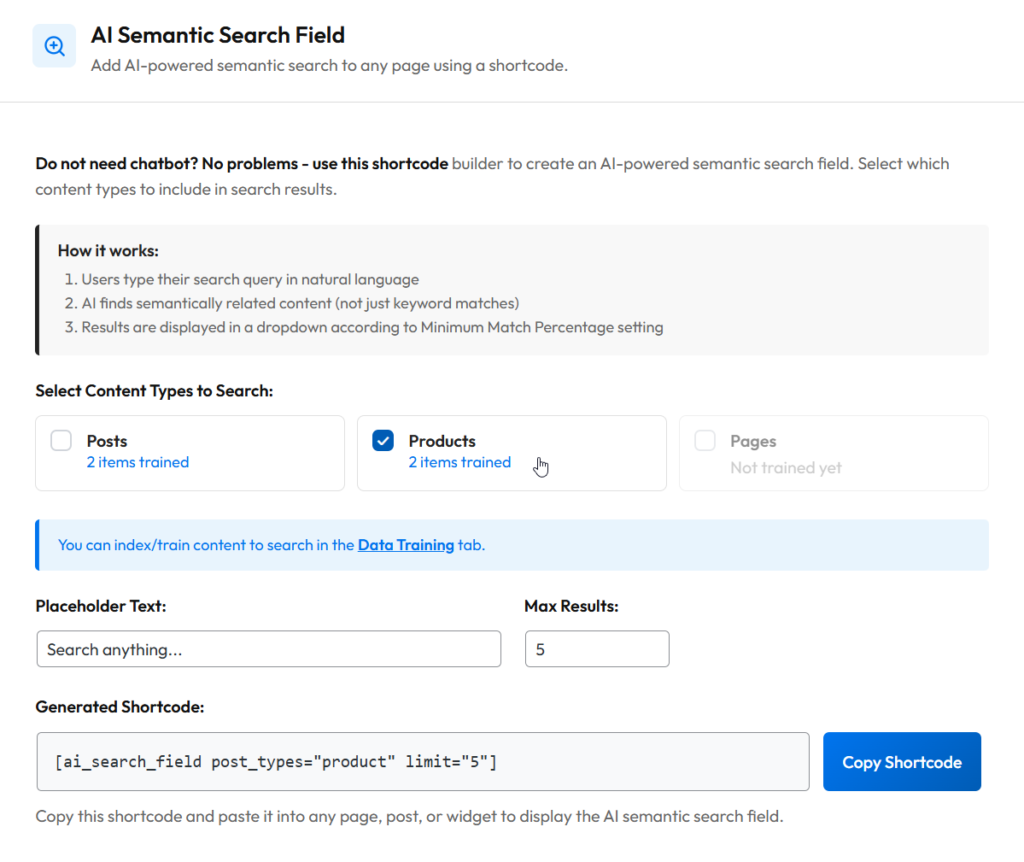
Step 5: Place the Search Field
Paste shortcode wherever you want search to appear:
- Shop page
- Header or sidebar widget
- Homepage
- Any Elementor section
- Anywhere accepting shortcodes
Done. Your store now has AI-powered search.
Customization Options
Shortcode Parameters
| Parameter | Description | Example |
|---|---|---|
| post_types | Content types to search | post_types="product,post" |
| limit | Max results in dropdown | limit="8" |
| placeholder | Search field text | Via settings panel |
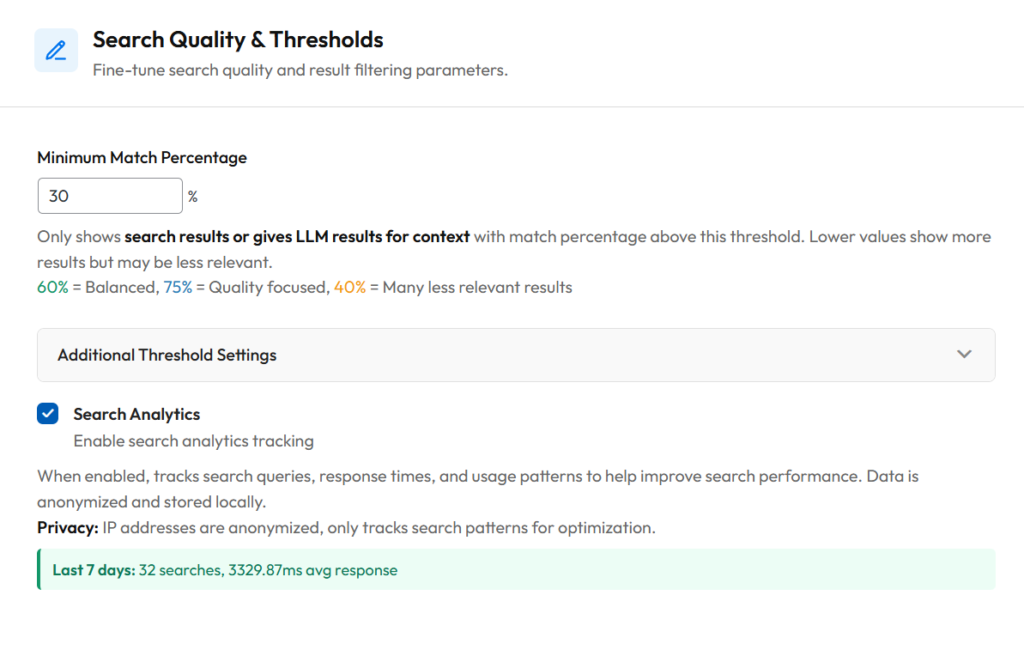
Match Percentage Threshold
Controls how closely results must match to appear:
| Setting | Results | Best For |
|---|---|---|
| 40-60% | More results, mixed relevance | Large catalogs, discovery |
| 65-75% | Balanced (recommended) | Most stores |
| 80-95% | Fewer, highly precise results | Specific product searches |
Default is 65%. Adjust in plugin settings.
WooCommerce-Specific Setup Tips
For best results with product search:
- Train only Products initially – Keep search focused on your catalog
- Write keyword-rich descriptions – AI works from your content, richer descriptions = better matches
- Set “Best Match” as default sort – Products with highest match scores appear first
- Adjust threshold based on catalog size – Larger catalogs can use lower thresholds
Real-World WooCommerce Examples
Fashion store: Customer searches “sneakers for gym.” Semantic search returns training shoes, athletic footwear, workout trainers. Standard search returns nothing because “sneakers” and “gym” aren’t in product titles that say “running shoes” and “fitness footwear.”
Electronics shop: Customer searches “noise cancelling headphones.” Finds products titled “ANC wireless headset,” “sound-isolating earphones,” and “ambient noise reduction buds.” Standard search misses these because the exact phrase doesn’t match.
Skincare store: Customer searches “anti-aging cream.” Returns products described as “wrinkle reduction,” “youth-restoring,” and “age-defying moisturizer.” The AI understands these mean the same thing.
The pattern is clear. People search using their words. Your products use different words. Semantic search bridges that gap.
Technical Details
What Gets Sent to AI?
During training:
- Product names, descriptions, categories
- Attributes and features
- Pricing information
During search:
- Only the user’s search query
- Comparison happens locally in your database
API Costs
Minimal for most stores. Embedding generation uses few tokens per product. Search queries use even less. Typical usage runs cents per day, not dollars.
Performance
- Results are cached to reduce API calls
- Embeddings stored in WordPress database (few KB per product)
- Handles thousands of products without issues
Analytics Dashboard
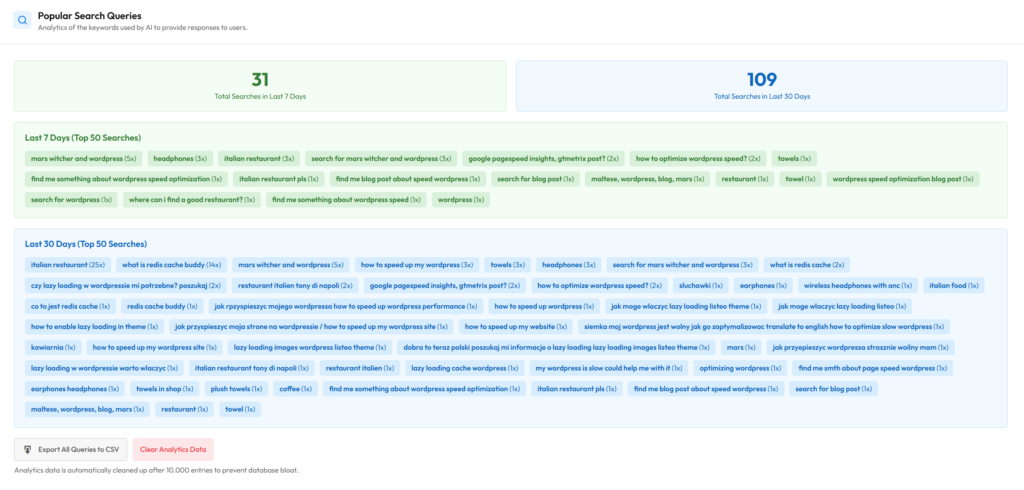
The Statistics tab tracks what users search for:
- Most popular search terms
- Searches with good results
- Searches returning nothing (content gaps!)
If users keep searching for something you don’t stock, that’s free market research.
Wrapping Up
In past – adding semantic search to WooCommerce used to require custom development. Now it’s a plugin and a shortcode. Customers find products even when they don’t use the “right” keywords. For ecommerce, that means fewer abandoned searches and more sales. Setup takes 5 minutes. The improvement is immediate.
Ready to upgrade your store’s search? Check out AI Chat & Search Pro and give customers a search that actually works. If you’d like to dive deep into automatic sales with AI in your store check Best AI Chatbot for WooCommerce article