









Best AI Plugins for WordPress in 2026: Work Smarter, Not Harder
Here’s the reality: in 2026, AI isn’t optional. Your competitors are already using it to publish faster, rank higher, and handle customer questions around the clock. The question isn’t whether to add AI to your WordPress site. It’s which plugins actually deliver without draining your budget on overpriced subscriptions.
These 8 selected AI-powered plugins are real tools that save real hours every single week. I’ve been testing AI plugins on client sites and my own projects throughout 2025, and the gap between what worked two years ago and what works now is massive.
Why AI Plugins Matter for WordPress Sites in 2026
The shift happened quietly but quickly. Google’s helpful content updates didn’t kill AI content like some predicted. They killed lazy AI content. Sites using these tools strategically (as a starting point, not a copy-paste solution) are outperforming those doing everything manually.
What really changed the game is pricing. The old model of paying $99/month for mediocre features is dying. Most quality plugins now use bring-your-own-API-key setups. You pay a reasonable license fee, connect directly to OpenAI or Google, and control exactly what you spend. For most sites, that means a few dollars per month in actual usage.
What AI Can Actually Do for Your WordPress Site
Forget the hype. Here’s what these tools deliver in practice:
- Cut content creation time in half. A blog post that took 3 hours now takes 90 minutes. AI handles the first draft, you add the human touch.
- Answer visitor questions 24/7. Chatbots that actually understand your content and provide helpful responses, not frustrating dead ends. Check our article about training AI on your WordPress site content →
- Translate your site without hiring translators. Neural machine translation has gotten scary good. 132+ languages, decent quality, fraction of the cost.
- Write product descriptions at scale. Got 500 WooCommerce products with empty descriptions? AI fills them in while you sleep.
- Optimize for SEO automatically. Real-time suggestions, Schema markup, keyword analysis. No more guessing.
- Generate images on demand. Custom graphics without stock photo subscriptions or designer invoices.
- Build forms in seconds. Describe what you need, get a working form. Done.
The best part? Most of this costs a few dollars per month in API fees. The expensive subscription model is dying. You pay for what you use, nothing more.
How I Picked Most Useful 8 AI Plugins
Not every AI plugin deserves your attention. I filtered out the garbage so you don’t have to.
- Active development with recent updates
- Strong reviews (4.5+ stars from real users)
- Transparent pricing without hidden fees
- Proven track record with thousands of installations
- Good support that actually responds
What follows are the winners across every category. No filler, no paid placements. Just the plugins worth installing.
Quick Comparison: Best AI Plugins for WordPress
| Category | Usage Examples | Plugin | Rating | Price |
|---|---|---|---|---|
| 💬 AI Chatbot | Customer support, product recommendations, FAQ automation, lead capture | AI Chat & Search | 4.9/5 | Free + $59 one-time |
| 🔀 Workflow Automation | AI agents, AI workflows, app integrations, automated tasks | Bit Flows | 4.9/5 | Free / $119 yr or $189 for lifetime |
| ✍️ Content Writing | Blog posts, product descriptions, landing page copy, email drafts | AI Engine | 4.9/5 | Free + $59/yr |
| 🔍 SEO | Meta descriptions, Schema markup, keyword optimization, internal linking | Rank Math | 4.9/5 | Free / $59/yr |
| 🌍 Translation | Multilingual stores, international landing pages, localized content | TranslatePress | 4.7/5 | Free / €99/yr |
| 💻 Code Assistance | Custom PHP functions, CSS tweaks, JavaScript snippets, site modifications | Code Snippets Pro | 4.7/5 | Free / ~$59/yr |
| 🛒 WooCommerce | Bulk product descriptions, auto-generated tags, product FAQs | AI Product Tools | 4.7/5 | Free + API |
| 📝 Forms | Contact forms, surveys, registration forms, payment collection | WPForms | 4.8/5 | Free / $59.50/yr |
| 🧱 Page Builder AI | Layout generation, hero sections, image editing, custom CSS | Elementor AI | 4.5/5 | $48/yr + credits |
| ✏️ Editor AI | Blog drafts, translations, tone adjustments, title optimization | Jetpack AI | 4.6/5 | $10/mo |
1. AI Chat & Search Pro: The Smartest Chatbot for WordPress

When it comes to best AI chatbots for WordPress, most plugins either charge ridiculous monthly fees or deliver underwhelming results. AI Chat & Search Pro from PureThemes breaks that pattern entirely.
This plugin uses RAG-based semantic search to actually understand your content. Unlike basic chatbots that just pattern-match keywords, AI Chat & Search Pro reads and indexes your entire site, then provides genuinely helpful answers based on what’s actually on your pages. It’s the difference between a chatbot that frustrates visitors and one that converts them. Wondering how RAG-chatbots work? Check our article.
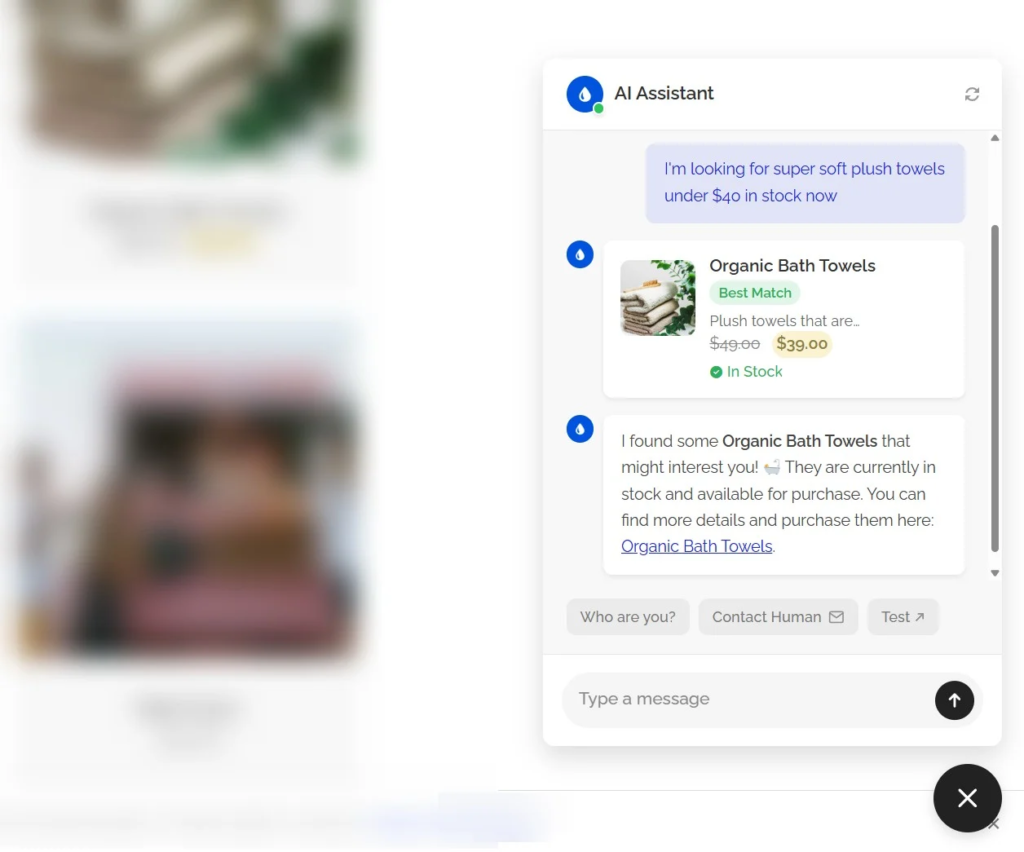
The standout feature? One-time pricing. While competitors like Tidio, Zendesk, and Intercom charge $29-99+ per month (that’s $348-1,188+ per year), AI Chat & Search Pro is a single purchase. You own it forever. For businesses tired of subscription fatigue, this alone makes it worth considering.
Key features:
- RAG-based semantic search for accurate, context-aware responses
- Supports OpenAI GPT-5.4 GPT-5.3, and Google Gemini 2.5 and 3.1 models
- Vector database integration with OpenAI embeddings
- Customizable chat widget that matches your brand
- Conversation history and analytics
- Works with WooCommerce product catalogs
- One-time purchase instead of monthly subscriptions
Pricing: One-time payment starting at $59 plus your API costs. No monthly fees, no per-conversation charges.

What I appreciate most is the transparency. You pay for your own API usage directly to OpenAI or Google, so there’s no markup or hidden costs. For sites with moderate traffic, you’re looking at just a few dollars per month in API fees.
2. AI Engine: The Swiss Army Knife for Content Creation
https://wordpress.org/plugins/ai-engine/
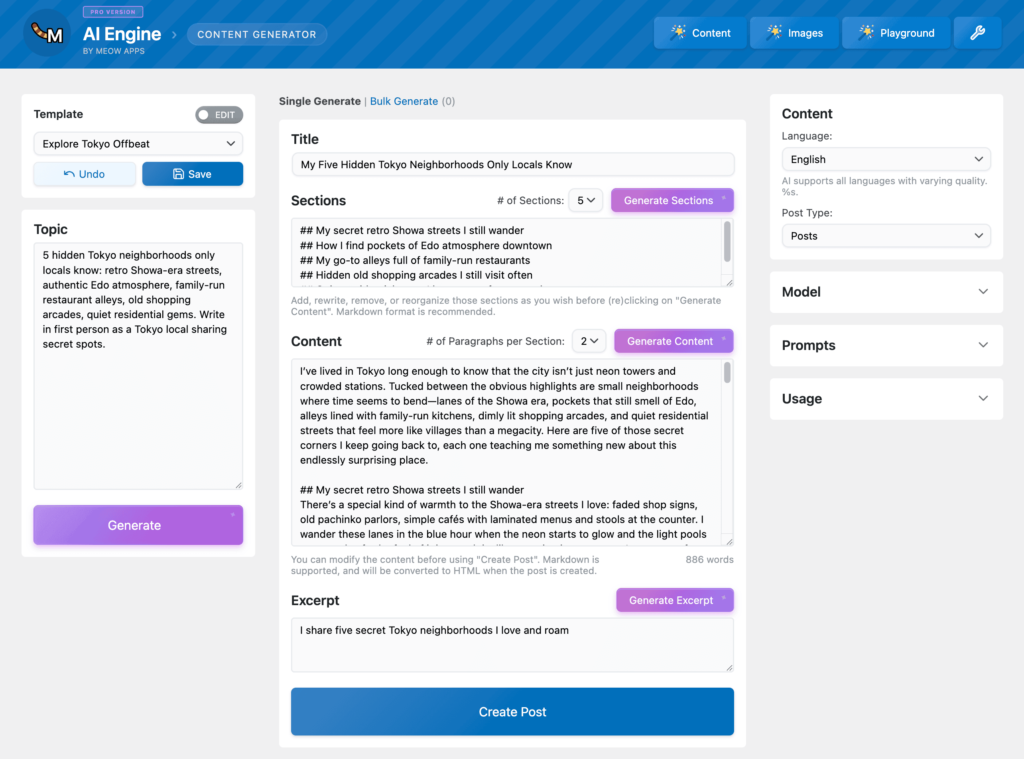
If you need one plugin to handle content writing and image generation, AI Engine by Meow Apps is the answer. With 100,000+ active installations and an impressive 4.9/5 rating from 783 reviews, it has become the go-to solution for AI-powered content workflows in WordPress.
What makes AI Engine stand out is its flexibility. You can connect it to OpenAI (GPT-4o, GPT-5), Anthropic Claude, Google Gemini, and even Hugging Face models. It uses a bring-your-own-API-key model, which means you pay for what you use rather than expensive monthly subscriptions.
The AI Copilot feature is particularly useful. It gives you real-time writing suggestions right in the WordPress editor, so you’re not constantly switching between tabs. Need an image? AI Engine handles DALL-E and Stable Diffusion generation without leaving your dashboard.
Key features:
- Native WordPress integration built specifically for WP
- AI Copilot for in-editor writing assistance
- Image generation via DALL-E and Stable Diffusion
- GDPR compliance tools included
- Extensive developer APIs for customization
- MCP (Model Context Protocol) support for external AI agents
Pricing: Free version available, Pro license costs $59/year plus your API costs.
2. Bit Flows: AI Workflow Automation for WordPress
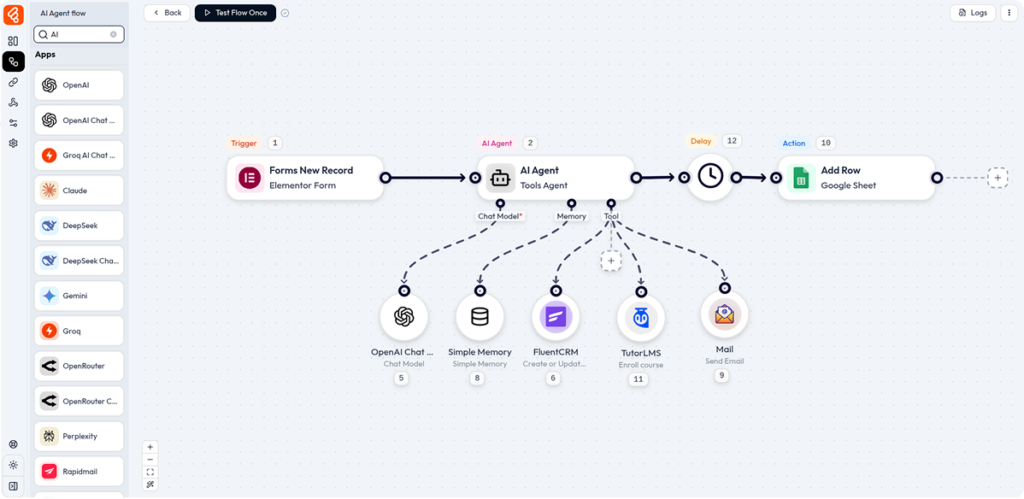
Most AI plugins focus on writing content or generating images. Bit Flows takes a different approach. It helps you automate entire workflows using AI and integrations, and AI agents, turning WordPress into a powerful automation hub.
Instead of doing repetitive tasks manually, Bit Flows connects your website with AI tools, marketing apps, and external services. You can build automated workflows that trigger actions across multiple platforms.
For example, when a form is submitted, Bit Flows can analyze the content with AI, send data to a CRM, generate a response, and notify your team, all automatically.
The visual drag-and-drop workflow builder makes this surprisingly simple. Even complex multi-step automations can be created without writing code. For site owners managing marketing, content, or customer workflows, this can save hours every week.
Key features:
- Visual drag-and-drop workflow builder
- Supports AI agents and AI-powered workflow automation
- Connects WordPress with 310+ apps and services
- AI integrations including OpenAI, Gemini, Claude, Deepseek, and Perplexity
- Unlimited workflows and task executions
- Conditional logic, routers, delays, and repeaters for advanced automation
- Custom API, webhooks, and custom app integrations
- Detailed logs and error notifications for debugging
- Affordable pricing and lifetime plans available
Pricing: Generous free version. Pro starts from $119/year or $189 lifetime with unlimited workflows and tasks.
Bit Flows runs directly inside WordPress, so your automation stays under your control. The visual workflow builder makes complex automations easy to understand and manage.
It’s a strong option if you want to combine AI tools, WordPress events, and external apps in one workflow.
4. AI Features in Page Builders: Elementor, Divi, Jetpack & More
You don’t always need a separate plugin for AI. Many of the tools you already use have built AI directly into their workflows. If you’re using Elementor, Divi, or even the default WordPress editor with Jetpack, AI is already at your fingertips.
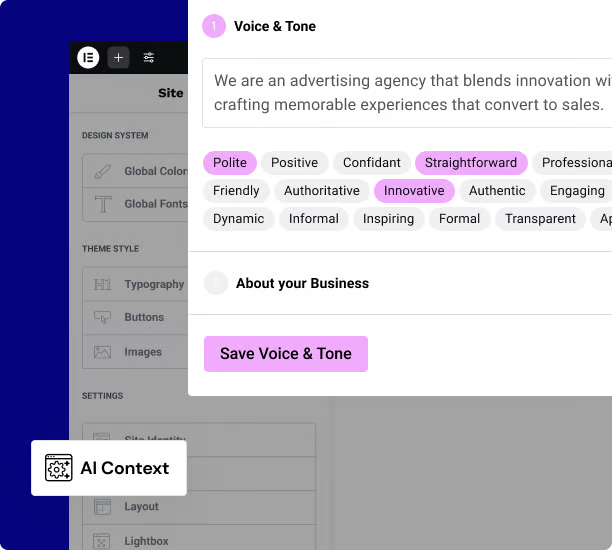
Elementor AI is the most comprehensive option for page builder users. It generates text, images, custom CSS, and entire container layouts without leaving the visual editor. The AI Copilot helps you design wireframes with tailored content, and the AI Context feature learns your brand’s tone of voice so generated content stays consistent. Need to extend an image or remove a background? Elementor’s image tools handle that too. Pricing works on a credit system starting at $48/year for 24,000 credits. One text prompt costs 1 credit, images cost 33, and full container generation costs 40.
Divi AI takes a different approach with unlimited generations. Every text field, image picker, and code input in the Divi Builder can “think” for itself. Ask it to write a headline, and it reads the context of your section to match the tone. The Divi Quick Sites feature generates entire websites from a few prompts, complete with images and content. Pricing is higher at around $193/year for existing Divi members, but the unlimited usage makes it worthwhile for agencies building multiple sites.
Jetpack AI Assistant works directly in the WordPress block editor (Gutenberg). It generates blog posts, tables, lists, and even featured images. The tone adjustment feature lets you switch between formal, casual, or persuasive with one click, and built-in translation covers 12+ languages. You get 20 free requests to start, then it’s $10/month for continued access. If you’re already using Jetpack for security or backups, adding the AI assistant is a no-brainer.

Spectra (formerly Ultimate Addons for Gutenberg) has integrated AI through their Zip AI library. With 1+ million installations, it’s become a popular choice for Gutenberg-first workflows. Spectra AI generates content, customizes pages, and builds dynamic designs directly in the block editor. The Pro version at $59/year unlocks advanced features alongside the AI tools.
5. Rank Math: AI-Powered SEO for 3 Million Sites
Rank Math pioneered AI integration in WordPress SEO plugins, and it’s maintained that leadership position with 3+ million active installations and a 4.9/5 rating across 7,324 reviews. Those numbers aren’t a fluke.
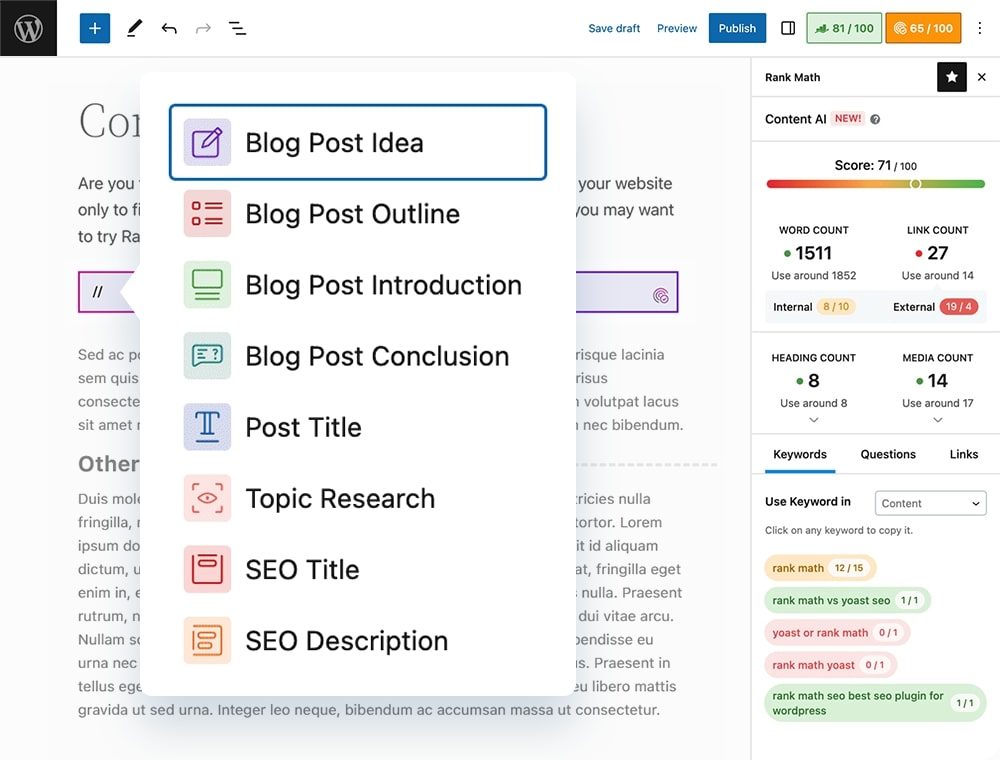
The Content AI feature uses NLP algorithms to help you create SEO-optimized content. It suggests keywords, analyzes your writing, and provides intelligent recommendations in real-time. But honestly, even without the AI features, Rank Math would still be the best free SEO plugin available.
You get 20+ pre-defined Schema types (more than any competitor), smart internal linking suggestions, Google Search Console integration, and unlimited keyword optimization. The free version is so comprehensive that most users genuinely never need to upgrade.
Key features:
- First WordPress SEO plugin with built-in AI
- 20+ Schema types included free
- 1-click migration from Yoast or AIOSEO
- Fastest-loading SEO plugin despite extensive features
- Auto-configuration wizard for beginners
- New llms.txt generator for AI search engine visibility
- Google Search Console integration
Pricing: Free version is incredibly full-featured. Pro costs $59/year, Business is $251.88/year.
The recent addition of llms.txt generator is forward-thinking. As AI search engines like Perplexity and ChatGPT become more prominent, having proper AI-readable site structure will matter more and more.
6. TranslatePress: Neural Machine Translation Done Right
If you’re running a multilingual WordPress site in 2026, TranslatePress is the plugin to beat. With 400,000+ active installations and a 4.7/5 rating from 1,579 reviews, it has become the standard for AI-powered translation. Here’s our comparison between WordPress translation plugins →
The visual front-end translation interface is what sets it apart. You translate pages exactly as visitors see them, not through some abstract backend editor. TranslatePress AI provides automatic neural machine translation via DeepL, Google Translate, and Microsoft Translator.

Key features:
- Visual front-end translation editor
- Supports 132+ languages
- Neural machine translation via DeepL, Google, Microsoft
- WooCommerce translation works out-of-the-box
- No page duplication (saves database space)
- You own all translations forever, even if license expires
- Translation blocks for context-aware AI translations
Pricing: Free version includes 2,000 AI words. Personal is €99/year (50K words), Business is €199/year (200K words).
Unlike WPML or Polylang, TranslatePress stores translations without duplicating posts or pages. This keeps your database clean and your site fast. And here’s something competitors don’t offer: you own all your translations forever, even if your license expires
7. Code Snippets Pro: AI Code Generation for Developers
Managing custom code in WordPress has always been a pain. Code Snippets solved that problem years ago, and now with 1+ million active installations, the Pro version adds AI-powered snippet generation that actually works.
Describe what you want in plain English, and GPT generates the PHP, JavaScript, CSS, or HTML snippet for you. But the killer feature is line-by-line AI code explanation. Select any snippet and AI explains exactly what each line does. For developers learning WordPress or debugging unfamiliar code, this is invaluable.

Key features:
- AI-generated code from natural language descriptions
- Line-by-line AI code explanations (unique feature)
- Safe mode recovery prevents broken snippets from crashing your site
- Cloud synchronization across multiple sites
- Conditional logic for when snippets execute
- Multisite network support
Pricing: Free version handles full snippet management. Pro with AI features costs approximately $30/year.
The safe mode recovery feature alone is worth the price. We’ve all accidentally broken a site with a bad snippet. Code Snippets Pro prevents that nightmare scenario.
For more ambitious projects, check out AIKO Developer Lite (6,000+ installs). It creates entire WordPress plugins from plain text descriptions, which is genuinely impressive when it works.
8. AI Product Tools: Bulk WooCommerce Content at Scale
Running a WooCommerce store with hundreds or thousands of products? Writing unique descriptions for each one is a nightmare. AI Product Tools solves this with bulk AI content generation that actually scales.
Though newer with 300+ installations, its 4.7/5 rating from 14 reviews reflects solid functionality. You can generate product descriptions, titles, tags, and FAQs across thousands of products simultaneously.

Key features:
- Bulk AI generation for descriptions, titles, tags, FAQs
- Connects to OpenAI, Google Gemini, or 300+ OpenRouter models
- Free models available (Llama, Mistral)
- “Edit Before Approve” workflow for quality control
- AI Shop Assistant chatbot for product recommendations
- Lightest-weight frontend payload on market
Pricing: Free version includes unlimited plain text generation plus your API costs.
The Edit Before Approve workflow is crucial. You review all AI-generated content in bulk before anything goes live. This prevents the “obvious AI slop” problem that plagues stores using fully automated solutions. If you want to en hance your WooCommerce store even further check out our guide: WooCommerce Automate Sales & Support
9. WPForms: AI Form Building for Everyone
With 6+ million active installations and a 4.8/5 rating across 14,239 reviews, WPForms dominates WordPress form building. The AI form generator creates complete functional forms from natural language descriptions, including complex surveys, payment forms, and multi-page workflows.

Just describe what you need: “Create a contact form with name, email, phone, and a dropdown for inquiry type.” WPForms builds it instantly. The AI Choices feature generates dropdown and checkbox options automatically, and you can refine forms through simple prompts like “add a phone number field” or “make this required.”
Key features:
- AI form generation from natural language
- AI Choices for automatic dropdown/checkbox options
- Conversational AI refinement
- 2,000+ pre-built templates
- Stripe payment acceptance even on free version
- AI translation for entire forms
Pricing: Free version includes AI form building. Basic is $59.50/year, Pro is $199.50/year.
Even the free Lite version includes AI form building and Stripe payments. That’s remarkable value for a plugin this established.
Frequently Asked Questions
What is the best free AI plugin for WordPress?
Rank Math SEO offers the most value in its free version. You get AI-powered content suggestions, 20+ Schema types, Google Search Console integration, and unlimited keyword optimization without paying anything. For content writing specifically, AI Engine’s free version is excellent, though you’ll need to provide your own API key.
Are AI plugins worth the cost?
For most WordPress sites, yes. The time savings alone justify the investment. Writing a single blog post can take 2-4 hours. With AI assistance, you can cut that to 30-60 minutes. If your time is worth anything, that math works out quickly. The key is choosing plugins with transparent pricing and avoiding subscription traps.
Which AI chatbot plugin doesn’t charge yearly/monthly fees?
AI Chat & Search Pro is the standout option here. While most chatbot solutions charge $29-99+ per month, AI Chat & Search Pro uses one-time pricing. You pay once, own the plugin forever, and only pay for your actual API usage directly to OpenAI or Google. No middleman markup.
Can AI plugins hurt my SEO?
They can if you use them lazily. Publishing unedited AI content at scale will eventually trigger Google’s spam detection. The solution is simple: use AI as a starting point, not a final draft. Edit everything. Add your own insights. Make it genuinely useful. Plugins like Rank Math help by analyzing content quality before you publish.
Do I need multiple AI plugins?
Not necessarily. AI Engine covers content writing and image generation in one package. But specialized tools often outperform all-in-one solutions in their niche. Rank Math beats AI Engine for SEO. AI Chat & Search Pro beats generic chatbot features. Choose based on your actual needs rather than feature checklists.
What are the hidden costs of AI plugins?
Most modern AI plugins use a bring-your-own-API-key model. The plugin license might be $59/year, but you’ll also pay OpenAI, Anthropic, or Google for API usage. For a typical blog generating 10-20 articles per month, expect $5-20/month in API costs. High-traffic chatbots or bulk WooCommerce generation will cost more.
Final Thoughts
The WordPress AI plugin landscape in 2026 rewards choosing established, well-maintained solutions over flashy newcomers. AI Engine provides the best value for content writing and image generation. Rank Math’s free version offers more than most premium SEO alternatives.
The pattern across all these plugins: bring-your-own-API-key models now dominate. This shifts costs from plugin licenses to usage-based AI provider fees. Entry costs stay low, but you’ll want to monitor API spending if you’re running high-volume operations.
Pick the plugins that match your actual workflow. Skip the ones that don’t. And remember: AI tools are most powerful when they enhance human creativity rather than replace it entirely.