


 EN
 PT
 DE
 FR
 ES
 TR
 IT
 PL
 NL
 EL
AI Built Into Your Directory
From setup to search, AI helps you and your visitors at every step.
- AI Help With Setup and Daily Work
- Grow Your Directory With Less Work
WORK FASTER WITH AI
Let AI Handle the Busy Work
Fill your directory with real places, manage your site by chatting with ChatGPT or Claude, and customize Listeo with a coding agent.
Connect Your AI Agent
to Listeo with MCP Plugin
Create pages, manage bookings, update taxonomies, filters, and manage your site just by chatting with AI. Skip the endless clicks and connect ChatGPT or Claude to Listeo with the MCP plugin.
AI Agent Skills for Listeo



Listeo works great out of the box – no code needed. But if you want to push it further, this kit gives your coding agent everything it needs (including 120+ hooks) to customize Listeo, update-safe.
AI-Enhanced  Data Importer:
 Data Importer:
Import Real Listings in Minutes
The Listeo Data Importer can fill your directory with real listings using Google API and OpenAI to generate SEO-friendly listings descriptions based on Google Reviews.
EASIER FOR VISITORS
AI That Guides Your Visitors
Smarter search, automated listings import and listing review highlights.

AI Smart Search
Listeo AI Search brings natural language search powered by OpenAI to your directory website. Instead of typing plain keywords, users can enter everyday phrases and get accurate search results.

-
Natural Language - users can search like they talk:
cozy restaurant with outdoor seating - AI understands context and finds listings that meet user needs
- Analytics Insights: track popular user searches

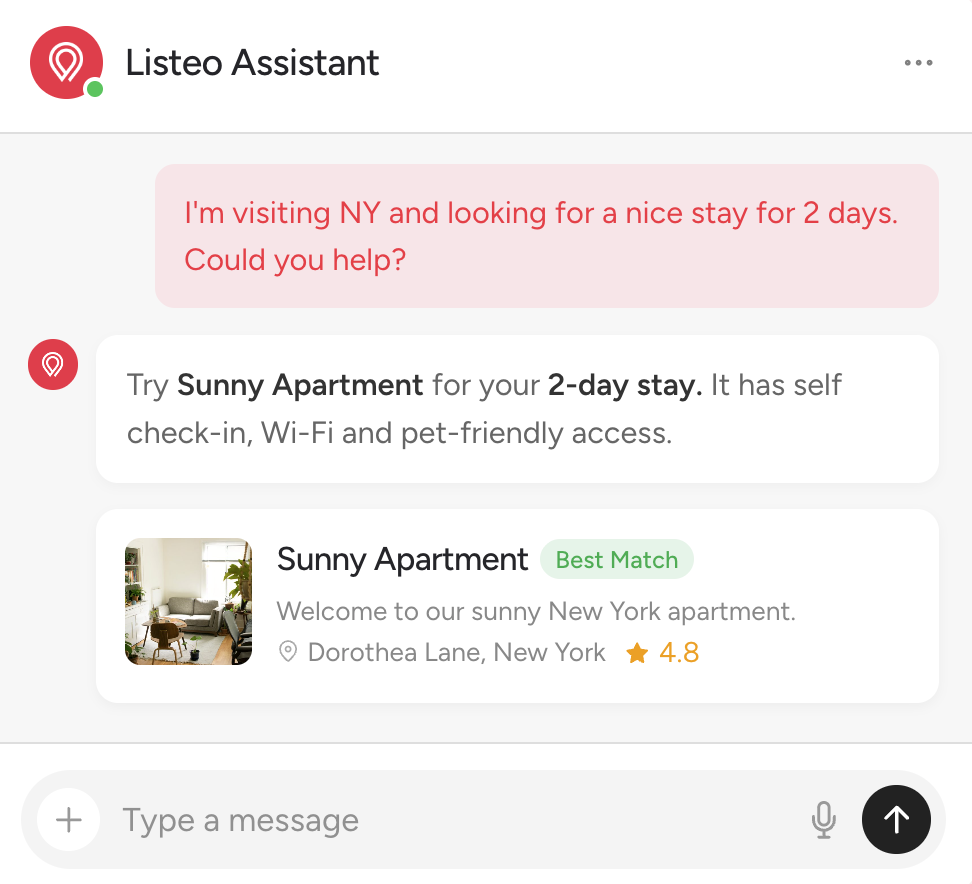
Built In AI Chat
AI Chat brings semantic understanding with real-time database search making your directory easier to use and increasing visitor engagement.
Meet Lisa, the AI Assistant Built Into Listeo Editor
Listeo Editor is where you build your forms, search filters and listing fields. Lisa works right inside it: tell her what your directory needs, and she sets it up for you.
- No API key neededOpen Listeo Editor and ask Lisa
- Forms and filters by askingConditional fields, taxonomies too
- Nothing changes without youLisa proposes, you apply or undo
Demo: in Listeo Editor you ask Lisa to add Condition to car listings and ask for mileage only on used cars. Lisa adds Condition and Mileage to the Add Listing form, with a rule so Mileage is shown only when Condition is Used, and adds both as filters to the search form, where Mileage follows the same rule. Preview then shows the search form as visitors see it: Mileage appears after choosing Used.
Your own listing taxonomies, like Fuel or Brand. Place them in Add Listing Forms and Search Forms.
lt_makeModels lt_model- New listing type "Car" (plural "Cars"), slug car.
- Booking: No Booking.
- It gets its own category taxonomy.
- New taxonomy "Make" (plural "Makes"), internal name lt_make.
- New taxonomy "Model" (plural "Models"), internal name lt_model, child of Make.
- Listing types: Car.
- "Year" (text), id _year.
- "Fuel type" (select), id _fuel_type.
- "Gearbox" (select), id _gearbox.
SMART TOOLS
Directory That People and AI Understand
Review highlights sum up what guests say, and AI assistants like ChatGPT get a clean copy of every listing.
Markdown for AI Agents
- ChatGPT, Claude and other AI get a clean copy of each listing
- No menus, scripts or maps to dig through
- Faster and cheaper for AI to read your details
Comparison: without the add-on, AI assistants get the full HTML page with menus, scripts and maps, which is heavy, slow and costly to read. With the add-on they get a clean Markdown copy with the name, address, opening hours and rating, which is light, fast and cheap to read.
AI Review Highlights
AI reads a listing's reviews, including Google reviews, and sums up the main pros and cons in one short card on the listing page, written in your site's language.
Example card: AI Review Highlights for a diner with three pros (Delicious and Affordable Food, Friendly Atmosphere, Generous Portions) and one con (Busy at Weekends).